AI 101: A Beginner's Guide to Artificial Intelligence
A plain-English map of artificial intelligence for complete beginners — what it is, what tools like ChatGPT are really doing, the vocabulary you'll keep hearing, how to prompt well, where it fails, and five experiments to try today. No hype, no PhD required.

Artificial intelligence suddenly seems to be everywhere.
It can write emails, generate images, help build websites, summarize documents, answer questions, create music, analyze data, write code, and occasionally explain something with the confidence of a professor who forgot to check whether the answer was actually true.
If you feel like AI appeared overnight and everyone else somehow received the instruction manual, you're not alone.
The good news is that you do not need to understand computer science, machine learning mathematics, or twenty-seven new acronyms before you can understand AI.
You just need a good map.
This is that map.
By the end of this guide, you should understand what AI actually is, what tools like ChatGPT are doing, what terms like LLM, prompt, and model mean, what AI is good at, where it can go wrong, and how to start using it yourself.
No hype.
No robot apocalypse.
No PhD required.
CHAPTER 01 · Start here
So… What Is Artificial Intelligence?
At its simplest, artificial intelligence is software designed to perform tasks that normally require some form of human intelligence.
That can include:
- recognizing images
- understanding language
- making predictions
- recommending products
- identifying patterns
- answering questions
- generating text, images, audio, or video
- helping complete complex tasks
AI itself is not especially new.
Recommendation systems, fraud detection, navigation software, spam filters, voice assistants, and facial recognition have all used forms of artificial intelligence for years.
What changed recently is that AI became much more generative.
Instead of only recognizing, sorting, or predicting information, modern AI systems can now create things.
They can write.
Draw.
Code.
Explain.
Summarize.
Brainstorm.
Translate.
And increasingly, they can use tools and complete multiple steps toward a goal.
That is why AI suddenly feels much more visible.
It stopped living quietly behind the software.
It started talking back.
The important distinction is simple.
CHAPTER 02 · The landscape
AI Isn't One Giant Robot Brain
One of the easiest mistakes to make when learning about AI is imagining that "AI" refers to one enormous system somewhere answering everyone's questions.
It doesn't.
AI is a broad category containing many different technologies and models built for different purposes.
A few of the terms you will hear most often are these.
Machine Learning
Machine learning is a way of building software that learns patterns from data instead of relying entirely on manually written rules.
For example, rather than programming thousands of rules describing what makes an email spam, a machine-learning system can study huge numbers of spam and legitimate messages and learn patterns that help distinguish between them.
Generative AI
Generative AI creates new material based on patterns it learned during training.
That includes systems capable of generating text, images, audio, video, and software code.
Large Language Models
A large language model, usually shortened to LLM, is an AI model designed to work with language.
Tools like ChatGPT use language models to understand prompts and generate responses.
They are trained on enormous amounts of text and learn statistical relationships between words, ideas, structures, and concepts.
And this is where things start getting interesting.
CHAPTER 03 · Under the hood
How Does an AI Like ChatGPT Actually Work?
This is the part that often gets buried under technical language.
So let's keep it simple.
A language model is trained by analyzing enormous amounts of text and learning patterns in how language works.
It learns relationships between words, ideas, sentence structures, concepts, and context.
When you type something into an AI system, it does not simply search a giant database for a prewritten answer.
Instead, it generates a response based on patterns it learned during training and the information available in the current conversation.
At a very simplified level, it is repeatedly predicting:
What should come next?
Then what comes next after that.
And after that.
The surprising part is that when this process is performed by a very large model trained on enormous amounts of information, the result can look remarkably intelligent.
It can explain physics.
Rewrite an email.
Debug software.
Compare business ideas.
Help outline a novel.
Or explain taxes using an analogy involving pizza.
Sometimes all in the same conversation.
Which brings us to another useful term.
Context matters enormously.
Compare these two prompts:
Write me a marketing post.
Versus:
Write a short Facebook post for a small Las Vegas web-design company targeting local business owners who have outdated websites. Keep it conversational, avoid generic agency language, and focus on mobile performance and personal service.
The second prompt gives the AI far more useful context.
Which means it has a much better chance of producing something you actually want.
This leads to one of the most important lessons in AI 101:
AI is often only as useful as the instructions and context you give it.
CHAPTER 04 · The core skill
Your First Superpower: Prompting
A prompt is simply what you ask or tell an AI to do.
It can be a question:
What causes thunderstorms?
An instruction:
Rewrite this paragraph so it sounds more professional.
Or something much more detailed:
Explain how thunderstorms form to a twelve-year-old. Use simple language, keep the answer under 300 words, and include one memorable analogy.
The more clearly you describe your goal, audience, constraints, and context, the better the result usually becomes.
A useful beginner formula is:
Task + Context + Constraints + Desired Result
For example:
- Task: Explain strength training.
- Context: I am completely new to fitness.
- Constraints: Avoid technical terminology and keep it short.
- Desired Result: Give me three exercises I can safely research and learn first.
Put together:
Explain strength training to a complete beginner. Avoid technical terminology, keep the explanation under 300 words, and give me three basic exercises I should learn first.
You don't need to speak some secret AI language.
You just need to communicate clearly.
The WebCraft Labz Rule: Talk to AI Like You're Briefing a Smart Assistant
Beginners sometimes make prompts too complicated because they think AI requires special commands.
Usually it doesn't.
Imagine you hired a very capable assistant who knows a great deal but knows almost nothing about your specific situation.
You would probably tell them:
- what you are trying to accomplish
- who it is for
- what information matters
- what you do not want
- what the finished result should look like
That is excellent prompting.
Instead of:
Make a website.
Try:
Help me plan a five-page website for a local plumbing company. The customers are homeowners in Las Vegas. The main goal is generating phone calls. I want the site to feel trustworthy and established, not corporate. Start by proposing the page structure.
That one extra minute of explanation can completely change the quality of the result.
AI works better when it understands the assignment.
CHAPTER 05 · Practical uses
What Can AI Actually Do?
A lot.
But not everything, and definitely not everything equally well.
Modern AI is especially useful when the task involves language, patterns, organization, creation, or transforming information from one format into another.
Here are some of the most common things people use it for today.
✍️ Writing
AI can help draft emails, blog posts, proposals, social media content, product descriptions, scripts, summaries, and outlines.
It can also rewrite something you already wrote to make it clearer, shorter, friendlier, more professional, or easier to understand.
That does not mean every AI-generated paragraph deserves to see daylight.
Think of it as a very fast first-draft machine.
You still bring the judgment.
💻 Coding
AI can help developers write code, explain unfamiliar code, debug errors, generate tests, plan features, refactor messy logic, and learn new frameworks.
For experienced developers, AI can dramatically speed up repetitive work.
For beginners, it can make programming much more approachable, because they can ask questions in plain English instead of searching through ten forum posts written in 2014.
But code generated by AI still needs testing.
Fast code that doesn't work is just a bug arriving express delivery.
🎨 Images and Design
Generative AI can create illustrations, concept art, product mockups, advertising concepts, branding ideas, textures, backgrounds, and visual prototypes.
This has changed creative work significantly, because you can now move from an idea to a visual concept in minutes.
That does not automatically replace professional design.
Generating an image is easy.
Knowing which image is good, appropriate, original, useful, and on-brand is a different skill entirely.
📊 Analyzing Information
AI can help examine documents, spreadsheets, reports, survey responses, research, customer feedback, and large blocks of text.
You can ask it to find patterns, summarize information, compare options, identify inconsistencies, or explain complicated material.
This is one of AI's most useful abilities, because it can turn a mountain of information into something closer to a map.
But the map still needs checking.
🧠 Learning
AI can act like an endlessly patient explainer.
Don't understand something?
Ask for another explanation.
Still don't understand it?
Ask for an example.
Still lost?
Ask it to explain the idea using baseball, cooking, LEGO, plumbing, Pokémon, or whatever makes sense to you.
This is where AI becomes especially interesting.
Traditional educational material usually gives everyone the same explanation.
AI can keep changing the explanation until one finally clicks.
🔎 Research
AI can help you identify questions worth researching, organize unfamiliar subjects, compare viewpoints, summarize sources, explain terminology, and build research plans.
But there is an important distinction here.
AI can help with research. It should not automatically be treated as the source.
Whenever accuracy matters, verify important facts using reliable sources.
Especially dates.
Statistics.
Medical information.
Financial information.
Legal information.
And anything that begins with:
My cousin says…
🤖 Completing Multi-Step Tasks
Some AI systems are beginning to move beyond simply answering questions.
They can use tools, search information, analyze files, write code, interact with software, and perform multiple steps toward a goal.
These systems are often described as AI agents.
CHAPTER 06 · The important part
Where AI Gets Things Wrong
AI can be astonishingly useful.
It can also be spectacularly wrong.
And sometimes the dangerous part is not that it is wrong.
It is that it can sound completely confident while being wrong.
That is why one of the most important AI habits is also the simplest.
Humans have this problem too.
AI just does it faster.
AI Doesn't "Know" Things the Way You Do
This distinction helps explain many AI mistakes.
Humans experience the world.
We see things.
Touch things.
Remember experiences.
Develop beliefs.
Form relationships.
Feel consequences.
AI systems process information.
Even when an AI response sounds thoughtful, emotional, funny, or self-aware, that does not mean it is experiencing those things the way a human does.
The language may look familiar.
The underlying process is very different.
That doesn't make the technology useless.
It just means we should be careful about projecting human characteristics onto it.
Five Things You Should Never Assume About AI
1. Don't assume it is correct. If the answer matters, verify it — especially when the response contains specific facts, numbers, dates, quotes, or claims about current events.
2. Don't assume it understands your situation. AI only knows the context available to it. If something matters, tell it.
3. Don't assume the first answer is the best answer. One of the biggest beginner mistakes is treating the first response like the final response. Ask it to make the answer clearer, give you three alternatives, state its assumptions, argue against its own recommendation, or tell you what you're missing. The conversation is often where the value appears.
4. Don't assume AI should make the decision. AI can help analyze options, surface tradeoffs, and challenge your thinking. Important decisions still require human judgment.
5. Don't assume every task needs AI. Sometimes the fastest solution is still a calculator. Or a checklist. Or calling somebody who knows what they're doing. Not every problem needs a robot attached to it.
The WebCraft Labz AI Survival Kit
If you remember nothing else from this guide, remember these five rules.
1. Ask Clearly
Tell the AI what you actually want.
Not:
Help with my business.
Try:
Give me five ways a local landscaping company could generate more repeat customers without increasing its advertising budget.
Specific questions create useful answers.
2. Give Context
Context is fuel.
Tell the AI who you are, who the audience is, what you're trying to accomplish, what you've already tried, what limitations exist, and what you want the final result to look like.
You don't need to write a novel.
You just need to give it enough information to stop guessing.
3. Question Confident Answers
If something sounds important, ask how confident it is, what could be wrong with the answer, what you should verify, and what sources would confirm it.
Better yet, verify the important pieces yourself.
AI is a useful thinking partner.
It is not a magic truth dispenser.
4. Use AI to Think With You, Not Instead of You
This might be the most important rule.
AI becomes much more powerful when you use it to explore, challenge, compare, improve, critique, explain, and experiment — instead of simply saying "do this for me."
Ask it to show alternatives.
Ask why.
Push back.
Change direction.
The best AI conversations often look less like ordering from a menu and more like working something out on a whiteboard.
5. Experiment
There is no perfect prompt.
There is no official correct way to use AI.
Try things.
Rewrite your prompt.
Upload information.
Ask for a different approach.
Tell it what you dislike.
Ask it to improve its own answer.
AI is unusually forgiving software.
You are allowed to poke it.
Your First Five AI Experiments
If you're brand new, try these.
Experiment 1: Learn Something
Explain quantum computing to me like I'm a complete beginner. Start with the basic idea and avoid technical terminology.
Then:
Now explain it using an analogy.
Then:
What part of that analogy is inaccurate?
That last question is important.
Experiment 2: Improve Something You Wrote
Paste an email or paragraph and ask:
Make this clearer without making it sound overly formal. Keep my meaning and tell me what you changed.
Compare the versions.
Don't automatically accept every edit.
Experiment 3: Brainstorm
Try:
Give me 20 ideas for a side business involving dogs. Avoid obvious ideas like dog walking and grooming.
Then:
Rank the five most interesting by startup cost, difficulty, and revenue potential.
Now you are using AI to explore rather than simply generate.
Experiment 4: Challenge an Idea
Tell AI something you're considering and ask:
Give me the strongest argument against doing this.
Then:
Now give me the strongest argument for it.
Then:
What information would I need before making the decision?
That is often far more useful than asking "is this a good idea?"
Experiment 5: Create Something
Try:
Help me design a simple mobile app that helps families track household chores. Start by defining the three most important user problems. Do not design features yet.
Notice the last sentence.
Sometimes telling AI what not to do is just as useful as telling it what to do.
AI 101 Quick Glossary
You do not need to memorize these.
You just need to stop feeling like everyone at the AI party is speaking entirely in acronyms.
Artificial Intelligence (AI) — Software designed to perform tasks associated with human intelligence, such as recognizing patterns, understanding language, making predictions, and solving problems.
Machine Learning — A method that allows software to learn patterns from data instead of relying entirely on manually programmed rules.
Generative AI — AI designed to create new content such as text, images, code, audio, or video.
Model — The trained AI system that processes information and produces results.
Large Language Model (LLM) — An AI model designed to understand and generate language.
Prompt — The question, request, instruction, or information you give an AI.
Context — The information available to the AI while it generates its response.
Token — A small piece of information, often part of a word or sentence, that a language model processes.
Training — The process used to teach an AI model patterns from large amounts of data.
Hallucination — When an AI generates inaccurate or invented information as though it were true.
Multimodal AI — An AI system capable of working with more than one type of information, such as text, images, audio, or video.
AI Agent — An AI system capable of performing multiple actions toward completing a goal.
Fine-Tuning — Additional training used to make an existing AI model better suited to a particular task, style, or type of information.
Neural Network — A computational system inspired loosely by the structure of biological brains and used to recognize complex patterns.
You do not need to understand the mathematics behind neural networks to use AI effectively, in much the same way that you don't need to understand fuel injection to drive to the grocery store.
So, Do You Need to Become an AI Expert?
Probably not.
Most people didn't need to become networking engineers to use the internet.
They learned how browsers worked.
How to search.
How to recognize suspicious websites.
How to send email.
How to navigate the new environment.
AI may follow a similar path.
The important skill will not necessarily be understanding every technical detail.
It will be knowing what AI can do, when to use it, what information to give it, when to question it, when to verify it, and when not to use it at all.
Those are practical skills.
And you can start learning them today.
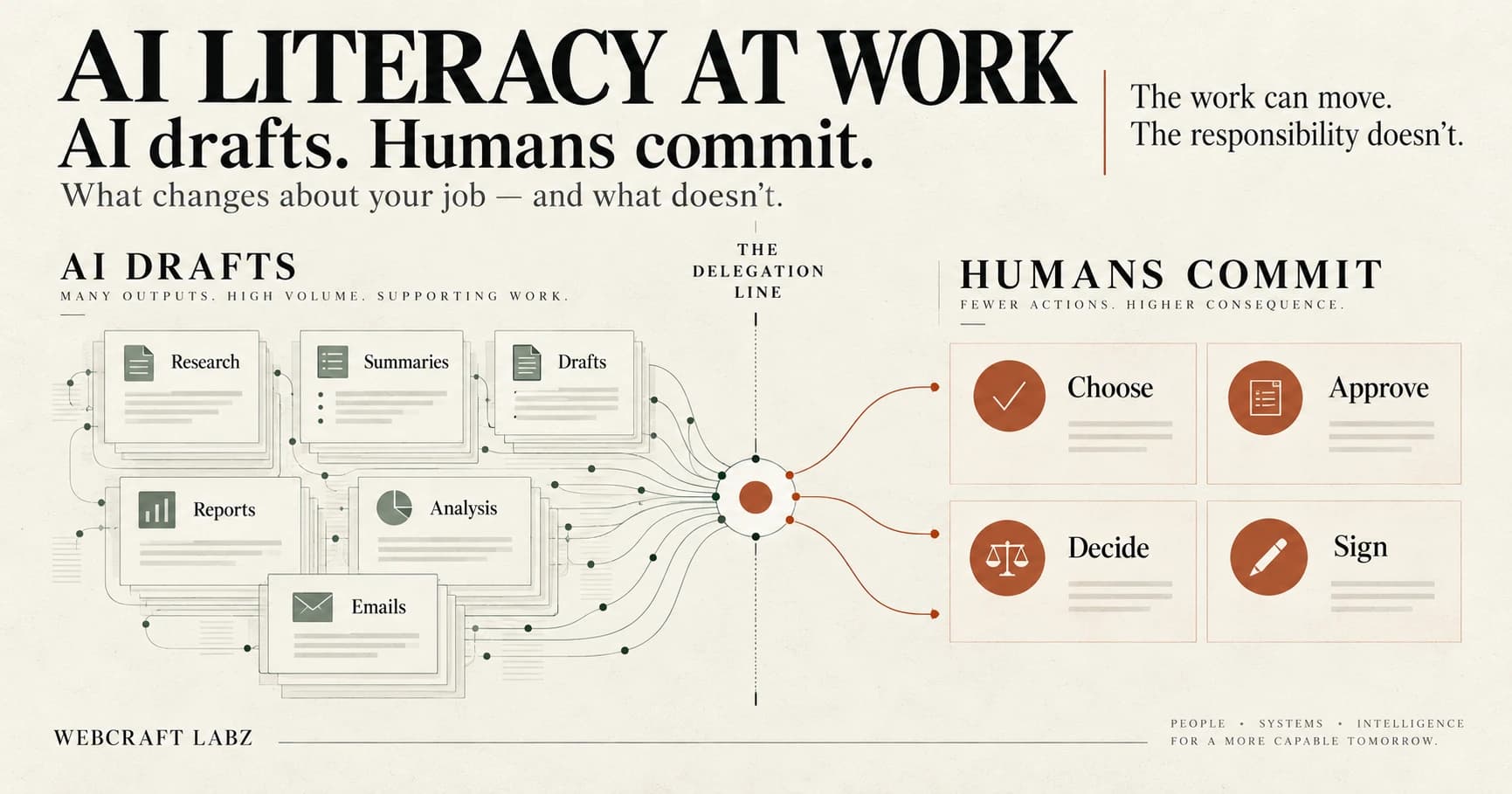
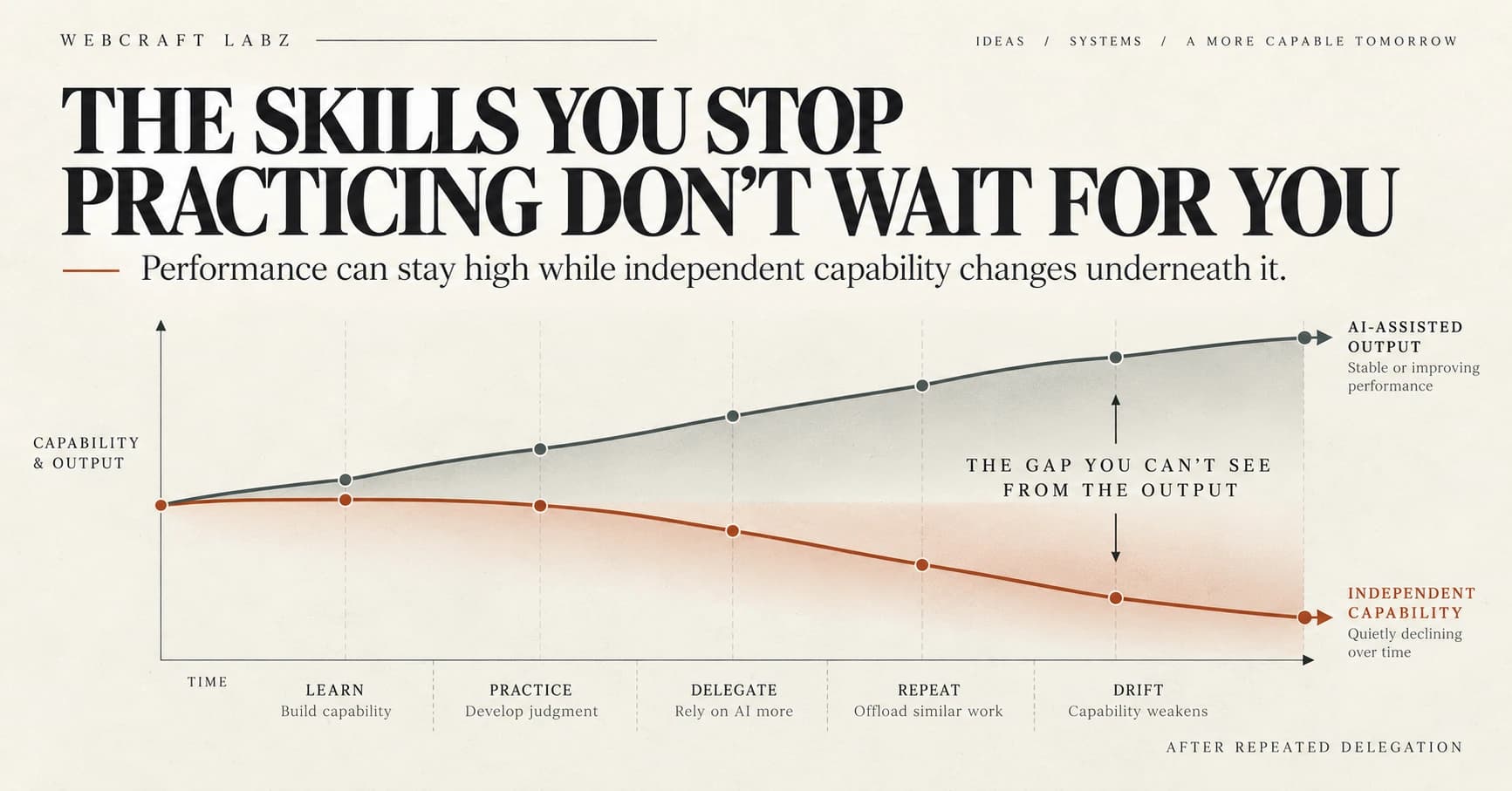
That raises a different question, which this guide deliberately does not answer: which parts of your own job are changing, and which parts stay yours. AI Literacy at Work takes that one up — what you can delegate, what you still have to evaluate, and where your name goes on the result.
The Bigger Idea
AI is interesting because of what the technology can do.
But the bigger story may be what happens when millions of ordinary people suddenly have access to tools that can help them learn, create, analyze, and build.
A person who cannot code can prototype software.
Someone who struggles with writing can organize their thoughts.
A student can ask for another explanation at midnight.
A small business can analyze information that once required specialized staff.
A curious kid can turn an idea into something real before anyone has time to tell them it is too complicated.
That does not mean expertise stops mattering.
It may mean expertise changes.
Knowing how to ask, how to evaluate, and how to direct intelligent tools becomes more valuable as the tools themselves become more capable.
AI lowers certain barriers.
It does not remove the need for judgment.
If anything, it makes judgment more important.
One Last Thing
You do not have to understand AI before you start using it.
Use it.
Question it.
Break your prompts.
Try strange ideas.
Ask better questions.
Pay attention to when it helps and when it doesn't.
The goal is not to become impressed by artificial intelligence.
The goal is to become capable with it.
Because AI probably won't remain a separate category of technology forever.
It will simply become part of how software works.
And someday, explaining that we once had computers that didn't respond intelligently might sound as strange as explaining dial-up internet to someone born with Wi-Fi.
Welcome to AI 101.
Build Something Better
Ideas deserve a better home than a generic blog.
WebCraft Labz builds fast, polished websites for businesses and creators who want their ideas to feel premium from the first scroll.
Start a ProjectContinue Reading