
Commerce 101: A Beginner's Guide to Selling Online
Beginner Edition
Shopify, BigCommerce, no-code, low-code, headless, APIs, payments, and the terms that somehow became everybody's problem.
In This Report
- 01What Ecommerce Actually Is
- 02Shopify, BigCommerce, and WooCommerce
- 03No-Code, Low-Code, and Custom
- 04What Is Headless Commerce?
- 05What Is an API?
- 06The Commerce Decoder
- 07Apps, Plugins, and Integrations
- 08Marketplace vs Your Own Store
- 09What Ecommerce Actually Costs
- 10What Beginners Usually Get Wrong
- 11Which Setup Do You Actually Need?
- 12Before You Choose Anything
- 13The Lab Verdict
Selling online sounds simple.
You have something to sell. Someone wants to buy it. You put it on a website, they click a button, money changes hands, everybody goes home happy.
Then somebody says Shopify. Someone else says WooCommerce. A developer mentions headless. A video tells you to use no-code. Another insists you need APIs. Then somebody starts talking about payment gateways, webhooks, CMS platforms, SaaS, SKUs, and composable commerce.
Suddenly, opening an online store feels less like starting a business and more like enrolling in night school.
It does not have to be that complicated.
This guide gives you the map before you start choosing roads. You do not need to become a developer. You just need to understand enough about the moving pieces to make good decisions.
01
The Foundation
An online store is not one thing.
Let's start with the simplest definition.
Ecommerce is the system that allows someone to discover a product or service, buy it online, pay for it, and receive it.
The website is only the visible part. Behind that storefront, several things have to happen. A typical purchase moves through six stages.
Storefront
This is what the customer sees. Your homepage, product pages, navigation, collections, search, branding, and the button that says Add to Cart all live here.
Cart
The cart temporarily keeps track of what the shopper wants to buy. It may also handle quantities, variants, discounts, shipping estimates, and promotional rules.
Checkout
Checkout is where the shopper confirms the order, enters contact and shipping information, selects delivery options, and provides payment information.
Payment
The payment system securely processes the transaction and determines whether the payment is approved.
Order
Once payment succeeds, the purchase becomes an order the business can track and manage.
Fulfillment
Now the business has to actually deliver what was purchased.
For a physical product, that may mean picking, packing, shipping, and tracking. For a digital product, it might mean automatically sending a download link. For a service, it could mean creating a booking, appointment, or project.
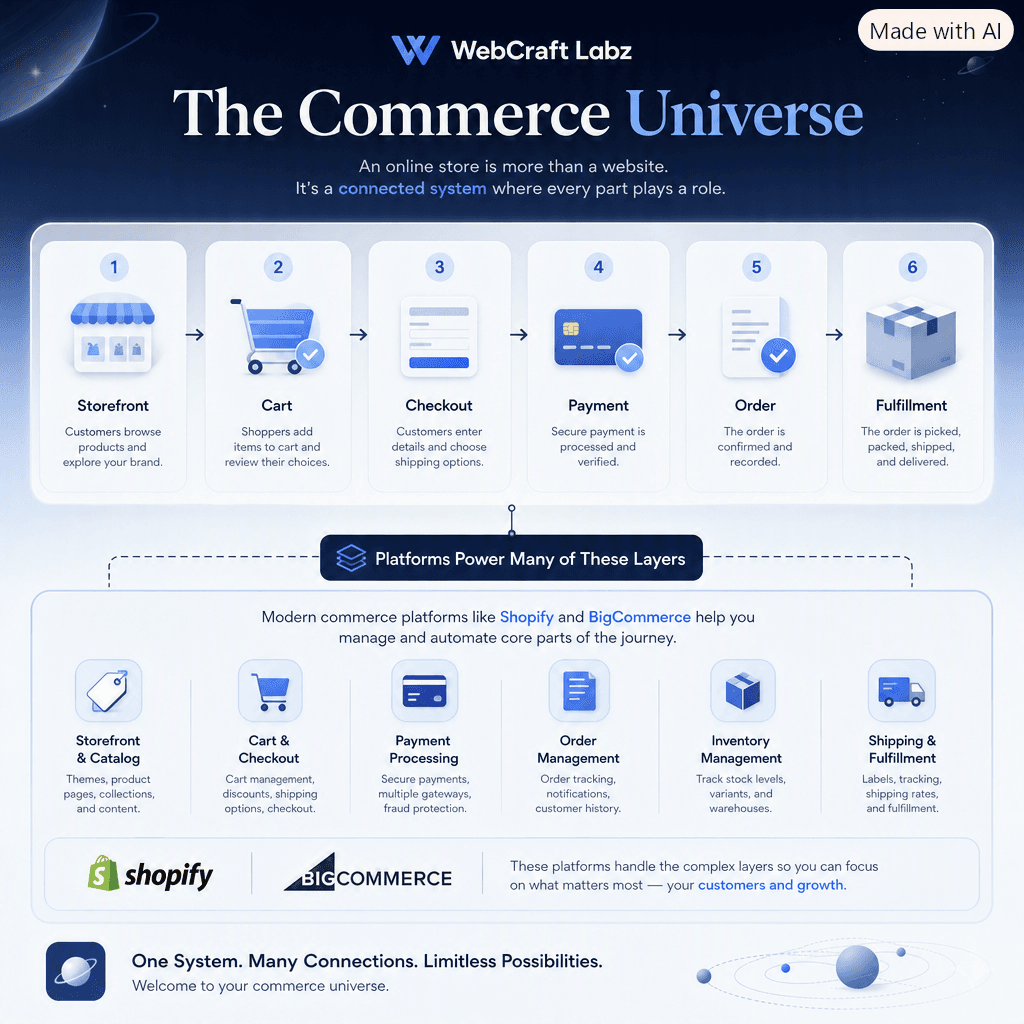
Six stages, one journey. Platforms exist to handle most of these layers for you.
The important idea is this.
An online store is not one thing. It is several connected systems working together.
Platforms such as Shopify and BigCommerce package many of these systems together so you do not have to build every piece yourself.
That brings us to the next question.
02
The Platforms
Shopify, BigCommerce, and WooCommerce.
These names get thrown around constantly, but they are not mysterious. They are simply different ways of providing the technology behind an online store.
Shopify
Hosted commerce platform
HostedShopify gives you much of the infrastructure needed to operate a store — products, inventory, orders, customers, checkout, payments, discounts, themes, apps, hosting, and administration. You log into a dashboard and manage the business from there.
Strengths
- ✓ A lot of hard infrastructure is already handled
- ✓ Large ecosystem of themes and apps
- ✓ Approachable for non-technical owners
Trade-offs
- – You work within the platform's structure
- – App subscriptions can accumulate over time
BigCommerce
Hosted commerce platform
HostedBigCommerce follows a similar model — a hosted platform that manages products, customers, orders, checkout, and other core commerce functions. It is often considered by businesses that want strong built-in commerce capabilities and room to grow.
Strengths
- ✓ Substantial commerce functionality available out of the box
- ✓ Integration and API options for more complex setups
- ✓ Infrastructure is still managed for you
Trade-offs
- – Smaller app ecosystem than Shopify's
- – Still a platform ecosystem with its own conventions
WooCommerce
Commerce built on WordPress
Self-hostedWooCommerce is different. It is a commerce system built around WordPress. If WordPress is already your website platform, WooCommerce can add ecommerce functionality to it. That gives you flexibility and a different ownership model.
Strengths
- ✓ Highly flexible and open source
- ✓ Strong fit for businesses already invested in WordPress
- ✓ Deep control over the code and the content layer
Trade-offs
- – You take on hosting, updates, and backups
- – Security and performance become your responsibility
An imperfect but useful way to picture the hosted platforms: it is a bit like moving into a retail space where the lights, plumbing, security system, and cash register are already installed. You still decide what the store looks like and what you sell.
The difference between Shopify and BigCommerce is less about one being universally better and more about which ecosystem, feature set, development approach, and business model fits the project.
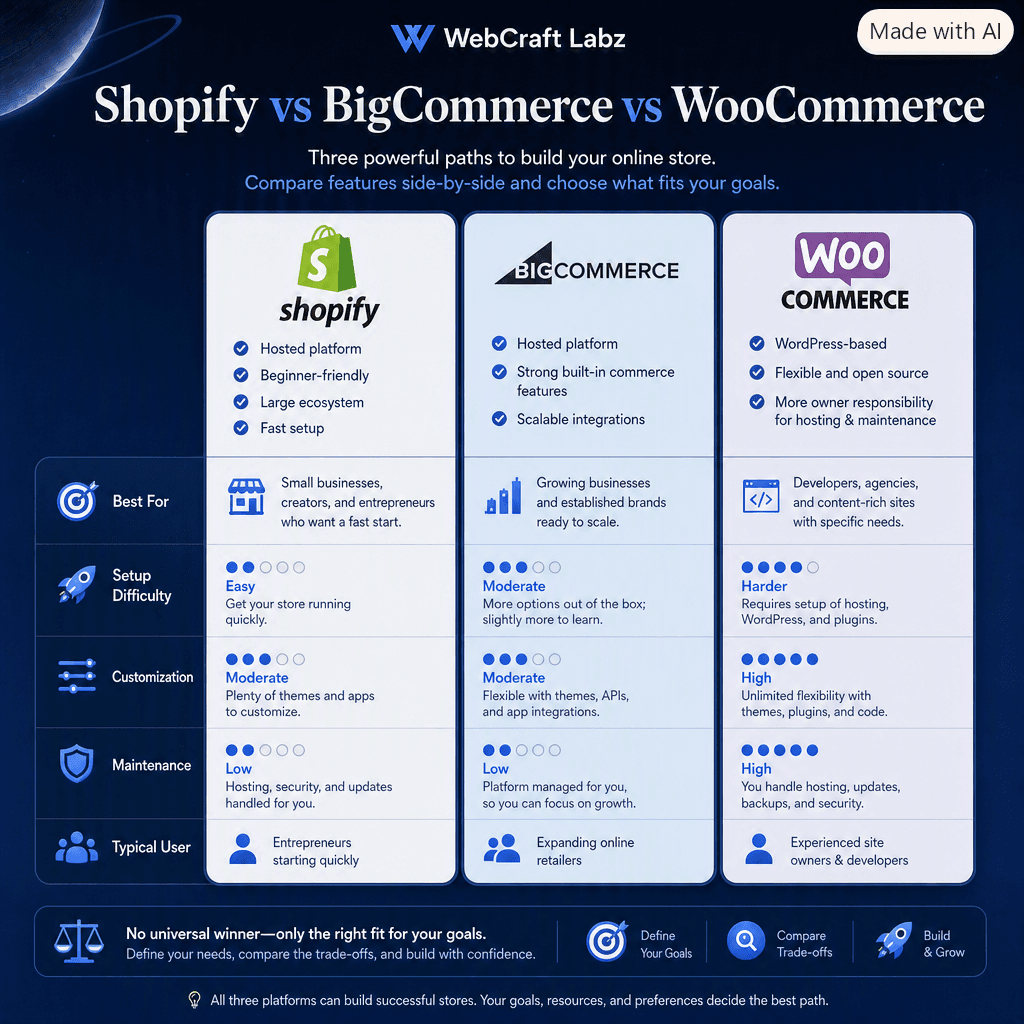
Setup difficulty, customization, and maintenance tend to move together.
The important takeaway is this.
There is no universal "best" ecommerce platform. There is only the platform that best matches the business you are trying to build.
A five-product local shop has very different needs from a company managing 40,000 SKUs across multiple warehouses.
Choosing technology without understanding the business first is backwards.
03
The Methods
No-code, low-code, and custom.
This is where the vocabulary starts getting slippery.
You may hear somebody say "just build it no-code." Another person says "we need a custom Shopify theme." Then a developer walks in and says "we should go headless."
These are not three competing brands. They describe different ways of building the store.
No-code commerce
No-code means you can build and manage most of the store without writing programming code yourself. That might involve selecting a theme, changing colors, uploading a logo, arranging page sections, creating products, configuring shipping, connecting payment methods, and installing apps.
You are still using sophisticated technology. You simply interact with it through visual tools instead of writing the underlying code.
It is often a great starting point for testing a new idea, small catalogs, solo entrepreneurs, simple stores, and businesses trying to launch quickly.
No-code gives you speed and simplicity. The trade-off is that you work within the limits of the platform and its available themes, apps, and settings.
Low-code commerce
Low-code sits in the middle. You still use an established platform to manage the difficult commerce infrastructure, but a developer customizes parts of the experience.
You might use Shopify for products, inventory, checkout, orders, and customer accounts — while having a developer build custom product sections, unique layouts, integrations, advanced filtering, special workflows, and custom design elements.
This is where many growing stores land. They do not need to reinvent ecommerce, but they have outgrown the standard template.
Custom commerce
Custom commerce means significantly more of the experience is designed and developed specifically for the business.
That does not necessarily mean someone is rebuilding payment processing, inventory, and checkout from scratch. A custom store might still use Shopify or BigCommerce behind the scenes. What changes is the frontend.
Custom Next.js storefront
↓
Commerce API
↓
Shopify / BigCommerce backend
↓
Hosted checkout
The business gets a custom storefront while still relying on an established commerce engine.
This is where the term headless commerce enters the picture.
04
The Buzzword
So what is headless commerce?
The name sounds much more dramatic than the concept.
In a traditional ecommerce setup, the frontend of the website and the commerce backend are tightly connected. The same platform handles both.
With headless commerce, they are separated.
Traditional commerce
Storefront + commerce backend, inside the same platform.
Headless commerce
Custom storefront
↓
API
↓
Commerce backend
The "head" is the customer-facing website. The "body" is the commerce system underneath. Remove the built-in storefront, replace it with your own frontend, and you have gone headless.
This approach can be useful when a business needs highly custom user experiences, unusual interfaces, app-like functionality, deeper content integration, multiple frontend experiences, or more design freedom.
But headless is not automatically better. It adds development complexity, and it moves work that the platform used to handle onto your team.
A business should use it because there is a reason to use it, not because the word looks impressive in a proposal.
05
The Connector
What is an API?
You are going to hear this term constantly. Fortunately, the basic concept is easy.
An API is a structured way for one piece of software to communicate with another.
Imagine your website asking Shopify:
"What products are currently available?"
Shopify responds with the product data. Your website then displays those products however you want.
Later, your website might ask:
"Create a cart with these three products."
The commerce platform handles that request and sends back the result. That conversation between software systems happens through an API.
APIs are what allow modern websites to connect commerce platforms with custom storefronts, email systems, shipping platforms, CRMs, search engines, mobile apps, inventory systems, and analytics tools.
Think of APIs as connectors between specialized pieces of software.
That is genuinely as much as most business owners need to know. The technical variations matter to the people writing the code, not to the person deciding what to build.
06
The Glossary
The Commerce Decoder.
Once you understand the basic system, the vocabulary becomes much less intimidating.
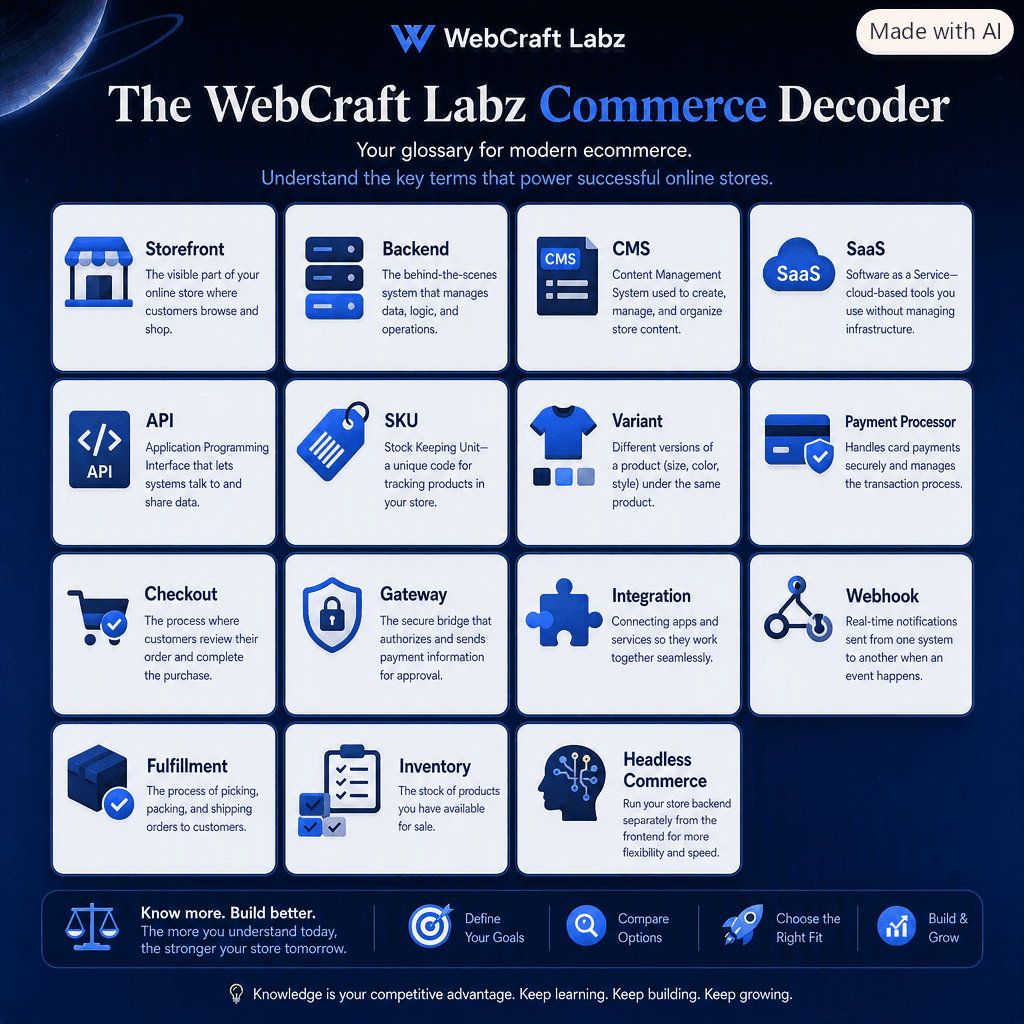
Fifteen terms that cover most ecommerce conversations. Expanded below.
Here are the same terms with a little more room to breathe. Open the ones you need and ignore the rest.
Storefront
The part of the store customers see and interact with — homepage, product pages, collections, navigation, and search.
Backend
The behind-the-scenes system where products, customers, orders, inventory, and business operations are managed. This is the admin side, not the shopper side.
CMS (Content Management System)
Software used to create and manage content such as articles, landing pages, guides, images, and editorial material. WordPress is a CMS. There are also modern headless CMS platforms that supply content to a custom frontend through an API.
SaaS (Software as a Service)
Instead of installing and maintaining software on your own servers, you use a service operated by another company, usually through a subscription. Shopify and BigCommerce are SaaS platforms.
API (Application Programming Interface)
An API is a structured way for one piece of software to communicate with another. In commerce, APIs can let a storefront request product data, create carts, connect inventory systems, or exchange information with other services.
SKU (Stock Keeping Unit)
An identifier used to track a particular product or a particular variation of a product. If you sell one shirt in three sizes and three colors, you may be tracking nine SKUs, not one.
Variant
A version of a product. A T-shirt might be one product available in small, medium, and large, and in black, blue, and white. Each combination can be a variant.
Payment processor
A service involved in processing the actual payment transaction and moving money between the customer's bank and yours.
Checkout
The process where a customer reviews the order, confirms details, and completes the purchase. It is the single most important stretch of the entire store.
Payment gateway
Technology that securely passes payment information between the checkout and the systems involved in authorizing the transaction.
You do not need to memorize the technical difference between every link in the payment chain. For most business owners the practical questions are: which payment methods can I accept, what are the fees, is checkout secure, and how quickly do I receive my money?
Integration
A connection between two different systems — for example, your store and your email platform, or your store and your accounting software.
Webhook
An automatic message one system sends to another when something happens. For example, "a new order was placed." That event can trigger another system to send an email, update inventory, notify a warehouse, or start a workflow.
Fulfillment
Everything that happens after the sale to actually deliver the product or service — picking, packing, shipping, tracking, delivery, or granting access.
Inventory
The products currently available for sale, and the system that keeps that number accurate across every place you sell.
Headless commerce
A commerce architecture where the storefront is separated from the commerce backend, and the two communicate through an API.
07
The Add-Ons
Apps, plugins, and integrations.
These deserve their own section, because they are responsible for both some of ecommerce's greatest conveniences and some of its greatest messes.
An app or plugin generally adds functionality to your store — reviews, subscriptions, loyalty programs, advanced search, upsells, email capture, shipping tools, or live chat.
An integration connects your store to another system, such as your accounting platform or a fulfillment warehouse.
The important rule for beginners is simple.
Do not install software just because somebody told you every store needs it.
Every additional tool adds some combination of cost, maintenance, complexity, data sharing, and performance overhead. A store carrying twenty apps is carrying twenty things that can break, expire, conflict, or quietly slow down a product page.
Start with the problem. Then choose the tool.
Not the other way around.
08
The Channel
Marketplace vs your own store.
There is another distinction worth understanding.
Selling through Amazon, Etsy, eBay, Walmart Marketplace, or another marketplace is not the same thing as operating your own ecommerce website.
Selling on a marketplace
- You sell inside somebody else's ecosystem.
- There is an existing audience already shopping there.
- Customers arrive familiar with the checkout and the return process.
- Marketplace fees apply to what you sell.
- Your product sits next to direct competitors.
- You have less control over branding and the customer relationship.
Running your own store
- You control branding, layout, content, and merchandising.
- You own the customer relationship and the data that comes with it.
- You decide the experience end to end.
- You are responsible for attracting every visitor.
- Marketing becomes a real, ongoing job.
- Growth compounds when it works, because the audience is yours.
There is no rule saying you have to choose only one. Many businesses sell through marketplaces and operate their own store, using each for what it is good at.
09
The Money
What does ecommerce actually cost?
This is where a lot of beginner guides become misleading.
A platform might advertise a relatively low monthly price. That does not mean the entire ecommerce business costs that amount. Your real cost comes from several different places.
Platform. The software subscription itself. Modest for a basic store, higher for larger businesses.
Domain. Your website address. Usually a small annual cost.
Theme or design. A free theme, a premium theme, a customized theme, and a completely custom design are very different investments.
Setup. Some owners configure everything themselves. Others hire help for store structure, products, navigation, payments, shipping, taxes, analytics, design, and SEO basics.
Apps. These can start cheaply and become a surprisingly large monthly expense as the store grows.
Payment processing. Online transactions generally carry processing fees, often percentage-based.
Product photography. You can shoot your own or hire a professional. What you sell matters here more than your budget does.
Copywriting and content. Product descriptions, category pages, landing pages, guides, and emails all have to be written by somebody.
Marketing. The store does not bring customers with it. This may eventually include SEO, content, email, social, advertising, and partnerships.
Development and maintenance. More customized stores tend to require ongoing technical work.
Illustrative planning ranges
The four ranges below are planning ranges for budgeting conversations, not quotes, market rates, or platform pricing. They exist to show how the tiers relate to one another. Your real number depends on the platform, catalog, design, content, integrations, shipping, business logic, and custom functionality involved.
DIY starter store
Roughly $100 – $1,000 initial setup, plus recurring platform and transaction costs.
Usually means self-configuration, a simple theme, a small catalog, minimal apps, and owner-created content.
Professionally configured small-business store
Roughly $1,500 – $6,000+.
Depends heavily on catalog size, customization, design, content, integrations, and shipping requirements.
Custom or low-code commerce
Often $4,000 – $12,000+.
This is where custom development, design work, integrations, and specialized functionality enter the project.
Headless or custom storefront
Often $10,000 – $30,000+, and potentially much higher.
Complex projects, multiple frontends, and heavy integration work push this range upward quickly.
The biggest cost factor is rarely the word ecommerce. It is the actual business requirements underneath it.
10
The Pitfalls
What beginners usually get wrong.
None of these are embarrassing mistakes. They are the default mistakes, and almost everybody makes at least one.
1. Choosing the platform before defining the business
Do not start with "should I use Shopify?"
Start with "what exactly does this store need to do?"
Technology comes second.
2. Assuming custom automatically means better
Custom software gives you control. It also creates responsibility.
If a standard platform solves the problem, that can be the smarter architecture.
3. Installing too many apps
Apps solve problems quickly. They also create recurring costs, overlapping functionality, slower pages, and maintenance headaches.
Use them deliberately.
4. Thinking the website creates demand
Building a store and generating traffic are two different jobs.
Your store is where the transaction happens. Marketing is how people find it.
5. Obsessing over technology instead of the buying experience
This one deserves more room than a card.
Customers generally do not care whether your frontend uses React, Liquid, PHP, or interpretive dance. They care whether they can:
- understand the product
- trust the business
- use the site on their phone
- find what they need
- complete checkout without friction
- receive what they ordered
Technology matters because it supports those outcomes. Not because the technology itself is the product.
A beautifully architected store that confuses shoppers is still a failing store. A plain one that makes buying easy is not.
11
The Decision
Which commerce setup do you actually need?
By now, the landscape should be much easier to read.
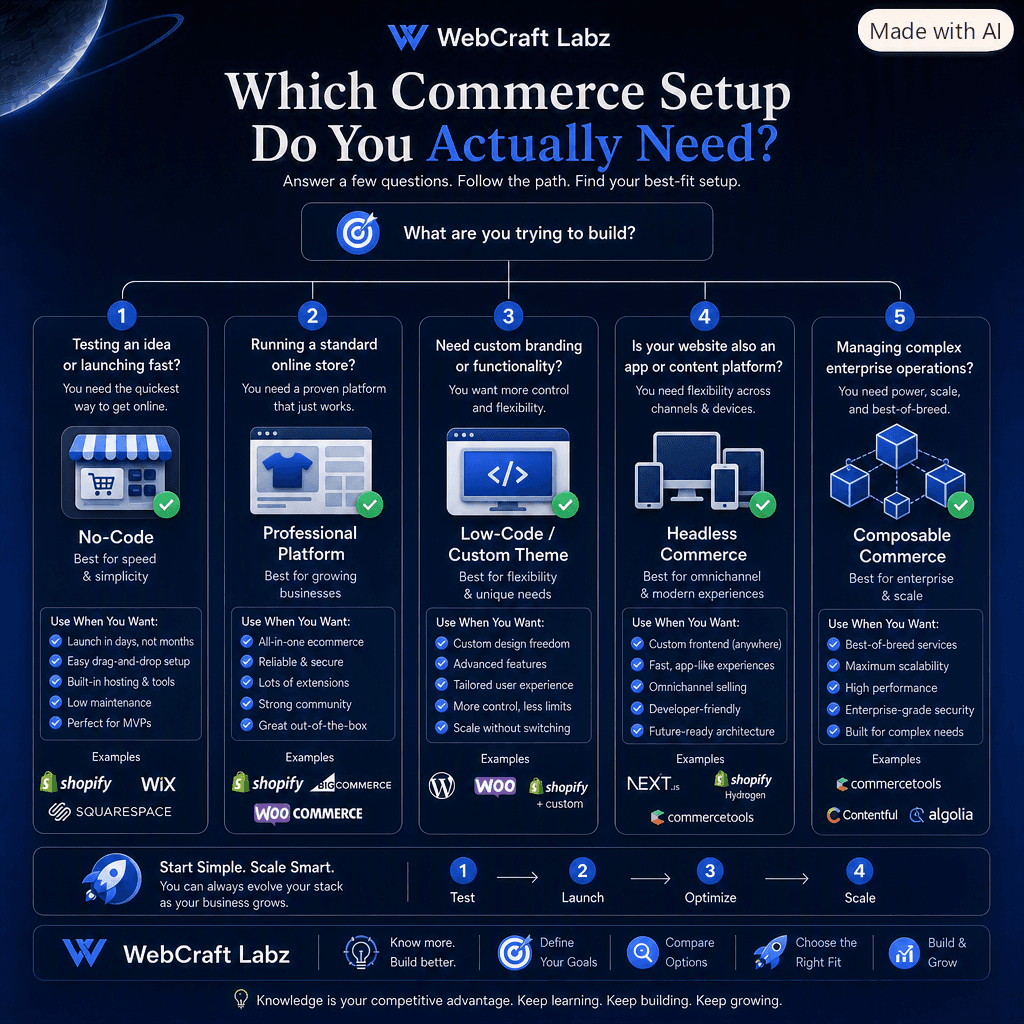
Five paths, one question. Most businesses belong in the first three.
A simplified way to think about it.
You are testing an idea. Start simple. A no-code or standard hosted platform is likely enough.
You are launching a serious small-business store. Look at an established platform such as Shopify, BigCommerce, or WooCommerce, then decide whether to configure it yourself or hire help.
You need custom branding or specialized functionality. You may be entering low-code or custom-theme territory.
Your website is also a major content platform, web application, or multi-channel experience. Headless commerce may start making sense.
Your business has enterprise-level operations. Now composable commerce, ERP connections, large-scale inventory systems, and deeper architecture may enter the conversation.
Most new stores do not belong in that last category.
And that is perfectly fine. Arriving there eventually is a good problem. Starting there is usually an expensive one.
12
The Prep Work
Before you choose anything.
Run through this before you compare a single platform. Every item here changes which setup makes sense.
- ✓Know what you're selling — physical products, digital products, services, or subscriptions
- ✓Know your catalog size — ten products and ten thousand products create different requirements
- ✓Know whether you need variants — size, color, material, configuration, personalization, or bundles
- ✓Know how customers receive the purchase — shipping, pickup, download, or appointment
- ✓Know your launch budget
- ✓Separate startup cost from ongoing monthly cost
- ✓Know how much customization you actually need — a unique brand is not the same as a custom architecture
- ✓Know your content requirements — if guides, SEO, and editorial content matter, that affects the platform choice
- ✓Know who will maintain the store — you, an employee, a freelancer, an agency, or a development team
That last one matters more than most people realize. The best platform for a business with a full-time developer is not always the best platform for a business without one.
The best architecture is usually not the most complicated one.
It is the simplest system that can reliably support the business you are building today, while leaving reasonable room for tomorrow.
Start simple when simple works.
Customize when the business actually needs customization.
Go headless when there is a real reason to separate the frontend from the backend.
Use composable systems when standard platforms genuinely break down.
And above all:
You do not need to know how every piece of ecommerce technology works internally. You just need enough clarity to ask better questions.
That is usually where better technology decisions begin.
Next Steps
- ✓What are you selling?
- ✓What does the customer need to be able to do?
- ✓What is the simplest platform that can handle it well?
Answer those three honestly and most of the platform debate settles itself.
Everything else can grow from there.
The platform is only half of it, though. A store can be built on exactly the right system and still not sell, which is a separate diagnosis with its own fixes.