
How Much Should a Website Cost? A Buyer’s Guide to Pricing, Scope, and Proposals
Website quotes range from a few hundred dollars to six figures for work that sounds identical on paper. Here’s what actually drives the number, what each tier really includes, and how to tell a fair proposal from an expensive one.
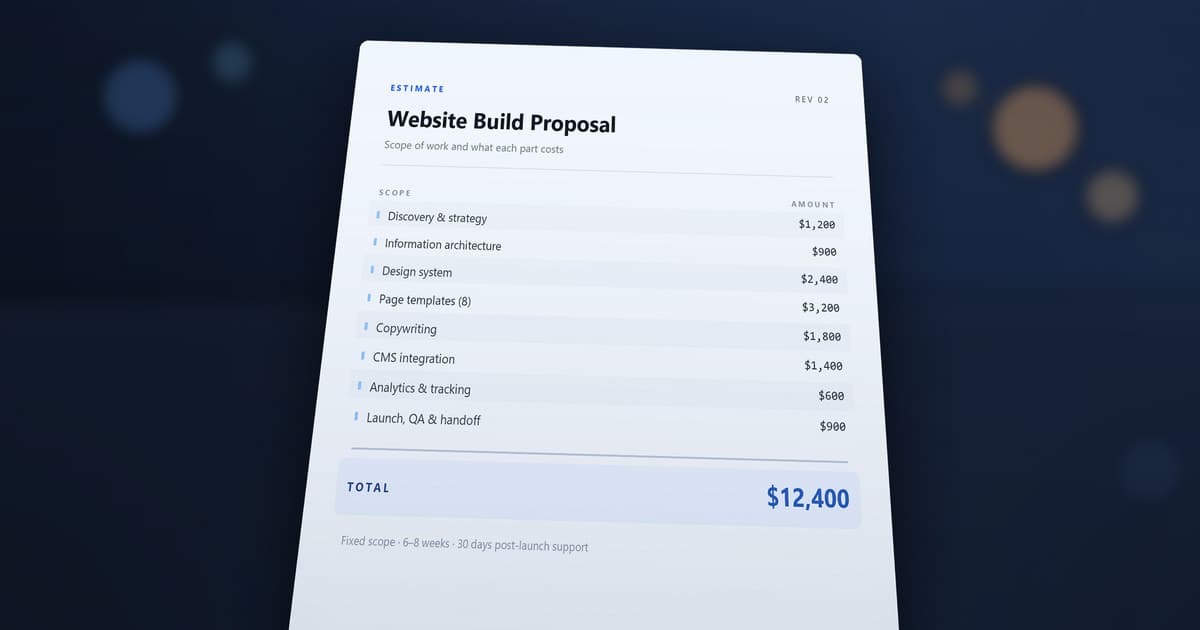
A small business website generally lands somewhere between $800 and $19,000, and that enormous spread is the real answer to the question. It isn't vagueness — it's the actual shape of the market. A three-page site with your own copy and a clean template is a genuinely different build from a ten-page custom site with a blog, a CRM connection, a payment flow, and someone else writing the words.
The number moves on scope, design depth, how much content you bring, what the site has to do, and who carries responsibility when something breaks.
Every dollar figure in this guide comes from our own build estimator. It's the authoritative source for a WebCraft Labz number — the same model produces the range on that page and the examples below. These are our prices, not an industry survey. Another studio's structure will differ, and that's fine; what matters is that you can see how a number is assembled rather than being handed a total.
Here's the thesis the rest of this guide unpacks:
Websites aren't priced by page count. They're priced by complexity, responsibility, and outcomes.
CHAPTER 01 · Before you compare a single quote
What are you actually buying?
Most confusing quotes come from a mismatch here. Three very different products get called "a website," and they don't share a price range.
An online presence. You need to exist, be findable, and look legitimate. A few pages, your own copy, a proven layout. Nothing bespoke, nothing that has to talk to another system. This is a real and often correct answer — plenty of successful businesses need exactly this and nothing more.
A custom marketing website. The site is part of how you win work. It has to say something specific to a specific audience, hold up against competitors, rank for things people actually search, and turn visitors into enquiries. Layout and structure are built around your business rather than dropped into a template.
A custom application. Somewhere along the way it stopped being a website. There are accounts, roles, permissions, a real data model, workflows your team depends on. The word "website" is now doing a lot of hiding — you're buying software, and software is priced differently. If that's you, the SaaS MVP cost guide is the right map, not this one.
The fastest way to tell them apart: ask what happens if the site goes down for a day. Mild embarrassment, a quiet week of enquiries, or your team can't work? Those three answers correspond to the three products, and they justify very different budgets.
CHAPTER 02 · How our model is structured
Base tiers, and what they don't include
Our estimator starts from a base tier set by page count, then adjusts. The base is the foundation — responsive layout, working contact path, on-page SEO basics, deployment and QA. It is deliberately not a finished quote.
| Project level | Base tier | Typical scope | What moves it higher |
|---|---|---|---|
| Starter Static (1–3 pages) | $900 | Home, services, contact. Your copy, a proven layout, working forms | Custom design, copywriting help, any feature needing its own page |
| Growth Site (4–7 pages) | $3,100 | Adds About and real navigation hierarchy, reusable components | Custom design, blog or news, integrations, content support |
| Full Site (8–10 pages) | $5,000 | Additional layout variants, deeper QA and polish | Multiple features, full copywriting, rush timing, complex integrations |
What the base actually includes
The base isn't a stripped shell. Every tier ships with the same foundation, and it's worth knowing so you can check whether a competing quote includes it:
- Responsive layout that works on real phones, not just a narrow browser
- Clear calls to action on every page
- A working contact form — name, email, message, actually delivering
- On-page SEO basics: page titles, meta descriptions, social preview tags
- Deployment and QA before launch
Growth adds expanded layouts, a real navigation hierarchy, and reusable components. Full adds additional layout variants and deeper QA and polish.
If a cheaper quote doesn't mention testing, form delivery, or metadata, it isn't cheaper for the same thing — those are the items most commonly dropped to hit a number, and the ones you notice last.
Those base figures are a starting line. Seven things move the final range:
- Design level — template or custom
- Content — ready, assisted, or written for you
- Features and add-ons — each has its own price and build time
- Page requirements — some features need their own pages, which can push you into a higher tier
- Timeline — rush work costs more
- Estimate range — every quote is a low-to-high band, not a single number
- Ongoing support — optional monthly care, priced separately from the build
To see your own combination, use the build calculator. It runs the same model.
CHAPTER 03 · The framework
The Website Cost Equation
Most pricing articles give you a list of factors. A list doesn't explain why adding one feature sometimes changes a quote by four times its listed price. This does:
Page count ─────► selects your base tier
                  $900   ·   $3,100   ·   $5,000

      Base tier
    + Content
    + Features & integrations
  ──────────────────────────────  subtotal
        × Design depth
        × Timeline
  ──────────────────────────────
        × 0.9   and   × 1.15
  ══════════════════════════════
    = the low–high range you see

    + Ongoing operations   (monthly, separate)
Three things about that shape matter more than the arithmetic.
Page count picks the base; it isn't a line item. Going from seven pages to eight doesn't add a page's worth of cost — it moves you to a different base tier. That's why page count is a blunt instrument for predicting price.
Everything is added before anything is multiplied. Content and features join the base to form a subtotal, and then design depth and timing scale the whole thing. Design isn't a line at the bottom of the invoice — a custom design means every page, component and state is drawn and built for you, so it scales with how much site there is.
The output is a range, not a number. The final low and high come from applying a spread to the same subtotal, which is why any honest estimate at this stage is a band.
Quality assurance, deployment and performance work don't appear as separate lines because they're inside the base tier — they're not optional extras you can decline.
Concretely, on a six-page build with your content ready:
- Template: $2,790 – $3,565
- Custom: $3,767 – $4,813
Same page count, same content, same features. The difference is design depth applied across the whole build.
Why a $650 feature rarely adds exactly $650
This is the part that surprises people, and it's worth being precise about because it's the single most common source of "why is the quote higher than I added up?"
A feature's listed price is an input to the estimate, not the change you'll see in the total. Take our SEO setup add-on, listed at $450:
| Same add-on, different build | Range before | Range after | Actual change |
|---|---|---|---|
| 6-page template, standard timeline | $2,790 – $3,565 | $3,195 – $4,082 | +$405 – $518 |
| 6-page custom, standard timeline | $3,767 – $4,813 | $4,313 – $5,511 | +$547 – $699 |
| 6-page custom, rush | $4,708 – $6,016 | $5,392 – $6,889 | +$683 – $873 |
The add-on enters the subtotal before design depth and timeline are applied, so its real effect depends on the build around it. On a template job it lands below its listed price; on a custom rush job, well above.
Page-affecting features go further. Some need their own pages — a blog needs an index and a post template — and that can push you across a tier boundary:
- Six-page template site: $2,790 – $3,565 (Growth Site)
- Add the blog, listed at $650: $5,085 – $6,497 (Full Site, now 8 pages)
That's a $2,295 move on a $650 line item, because the blog took the build from Growth into Full. Nothing is padded — the site genuinely got bigger. But it explains why totting up feature prices and adding them to a base almost never matches the real quote.
CHAPTER 04 · Where the money actually goes
What drives the price
Eleven things move a website quote. For each: what you're paying for, what pushes it up, and when you can skip it.
1. Base build and scope
Paying for: the structural work — responsive layout, navigation, reusable components, forms that actually deliver, deployment, and testing before launch.
Pushes it up: more page types. Ten pages using three templates is far less work than five pages that are each bespoke. Page count is a proxy for scope, not the driver.
Skip it when: you can't. This is the floor.
2. Design depth
Paying for: a layout system built around your business rather than adapted from a template. Custom typography and spacing, components designed for your content, states and edge cases drawn rather than improvised.
Pushes it up: more unique page types, more brand specificity, more responsive breakpoints that need real attention.
Skip it when: your market doesn't buy on differentiation, your content is conventional, and a well-chosen template will hold up. A good template beats a rushed custom design.
3. Content and copywriting
Paying for: the words. Whether you supply them, get help shaping them, or hand it over entirely.
On a six-page custom build, this is what content readiness does to the range:
| Content | Estimate | Build hours |
|---|---|---|
| Ready to go | $3,767 – $4,813 | 42 |
| Copy assistance | $4,253 – $5,434 | 48 |
| Full copywriting | $5,225 – $6,676 | 60 |
Pushes it up: more pages needing original copy, technical subject matter, interviews or research.
Skip it when: you genuinely have finished copy. But be honest — "I'll write it" is the single most common cause of a delayed launch. Half-written content stalls more projects than technical problems do.
4. Functionality
Paying for: the things the site does beyond presenting information — booking, email capture, member areas, dashboards, search.
Pushes it up: each feature has build time and its own failure modes to handle. Two features that each work are not the same as two features that work together.
Skip it when: you're adding it because it seems standard. A booking system nobody uses is pure cost, and you can add it later once demand is real.
5. Integrations
Paying for: connecting your site to systems you don't control — CRM, email platform, payment processor, scheduling tool.
Pushes it up: every integration is a dependency with its own quirks, authentication, error states and testing burden. This is scope, not a checkbox.
Skip it when: the manual version is still tolerable. If you get four enquiries a week, copying them into your CRM by hand costs less than automating it.
6. Ecommerce
Paying for: product structure, cart and checkout, payments, tax and shipping logic, order handling.
Pushes it up: product variants, subscriptions, complex tax or shipping rules, inventory syncing with another system. Selling five products is a different build from selling five hundred with options.
Ecommerce also changes the shape of the project. A marketing site is mostly finished at launch; a store is a system you operate. Someone has to manage stock, handle failed payments, process refunds and answer where-is-my-order emails. Budget for the operation, not just the build — that ongoing load is the part most first-time sellers underestimate.
If you haven't settled on a platform yet, Commerce 101 compares the main setups — hosted platforms, no-code builders, and headless — and what each one asks of you after launch.
Skip it when: you sell a handful of items and a payment link or invoice works. Full ecommerce for occasional sales is a large investment in machinery you barely run.
7. CMS and admin
Paying for: the ability to change things yourself — editing copy, publishing posts, updating products, without a developer.
Pushes it up: more editable surfaces, more content types, more roles and permissions. "Make everything editable" is expensive and usually unnecessary.
Skip it when: you update the site twice a year. Paying a developer for occasional edits is often cheaper than building and maintaining an admin you rarely open.
8. SEO, migration and redirects
Paying for: on a new site, technical foundations — clean structure, metadata, sitemap, analytics. On a rebuild, something more important: carrying your existing search visibility across.
Pushes it up: the size of the existing site and how many URLs are changing. This is the most commonly under-scoped item in a redesign, and the most expensive to get wrong. A rebuild that drops redirects can lose rankings that took years to earn. If the answer you land on is rebuild, what website modernization actually requires covers how to carry that history across without losing it.
Skip it when: you're brand new with no existing traffic. There's nothing to migrate — but you still want the technical baseline.
9. Performance, accessibility and QA
Paying for: the site being fast, usable with a keyboard and screen reader, and tested on real devices before launch rather than after.
Pushes it up: heavy media, many templates, strict accessibility requirements, or an audience on poor connections.
Skip it when: you can't, entirely — but the depth is negotiable. A formal accessibility audit is essential for some organisations and overkill for others.
10. Timeline
Paying for: compressing the schedule. Rush work reorders other commitments and removes slack from the process.
In our model, rush timing raises the estimate by a quarter. That same six-page custom build:
- Standard: $3,767 – $4,813
- Rush: $4,708 – $6,016
Skip it when: the deadline is preference rather than a real event. If there's no launch tied to it, standard timing buys you a better site for less.
11. Maintenance and ongoing operations
Paying for: the site staying current after launch — security updates, monitoring, small edits, performance checks.
Our care plans run $149, $299 or $599 per month depending on how much ongoing attention and content support you want, and self-managing is a legitimate option.
Pushes it up: more frequent changes, more content published, closer monitoring.
Skip it when: you're comfortable handling updates and can tolerate fixing something yourself if it breaks. Just make it a decision rather than an oversight — an unmaintained site degrades quietly.
CHAPTER 05 · An honest look at both ends
Cheap isn’t bad, and expensive isn’t better
Cheap websites have a bad reputation they only sometimes deserve.
A lower-cost build is often exactly right. If your scope is genuinely simple, your market doesn't buy on differentiation, your content is ready, no workflows are involved and the business isn't riding on the site, then paying for depth you won't use is just waste.
What you're trading is real, though, and worth naming:
Where lower-cost builds save
- Templates instead of custom layout
- Little or no strategy phase
- Fewer revision rounds
- You supply all content
- Lighter QA and device testing
- Few or no integrations
- Minimal post-launch support
What that usually costs you
- Looks like competitors using the same template
- Structure reflects the template, not your funnel
- Less room to correct course mid-build
- Launch waits on your writing
- Bugs surface after launch, on real visitors
- Manual work continues indefinitely
- You own every problem from day one
None of those are automatically wrong. They're only wrong when nobody told you they were the trade.
The opposite error is just as common. A higher price doesn't guarantee a better outcome — it can buy account management layers, discovery documents nobody reads, or a design system for a five-page site. The question isn't whether a quote is high or low. It's whether what you're buying matches what the business actually needs.
CHAPTER 06 · Before you budget for new
Repair, redesign, or rebuild?
Plenty of sites don't need replacing. Knowing which situation you're in is worth real money, because the three cost very differently.
Repair when problems are isolated and the structure holds. Unclear messaging, weak calls to action, a bloated form, missing proof, slow images. These are content and configuration problems. A new site won't fix them by itself — you'd arrive at a new site with the same unclear headline.
Redesign when the experience, message or visual language is the constraint but the underlying platform still works. Navigation that doesn't match how customers think, layouts that can't carry your current offers, a brand that's moved on.
Rebuild when the platform itself is the constraint. You can't make the fixes you need at reasonable cost, maintenance is fragile or expensive, performance problems are architectural, or the site can't support integrations the business now depends on.
If you're not sure which applies, work through the conversion diagnostic first. It scores a site across eight areas and tells you whether your problems are content-level or structural — which is exactly the input this decision needs.
CHAPTER 07 · Same brief, different prices
DIY, freelancer, studio, or agency
Price differences between providers are mostly differences in what they absorb — risk, coordination, and the parts of the job nobody quotes for.
DIY / site builder. Cheapest in money, most expensive in your time. Genuinely fine for a simple presence if you have the hours and patience. The hidden cost is the weeks you spend on it and the ceiling you hit when you need something the builder doesn't do.
Low-cost freelancer. Good value for well-defined, contained work. Limitations are capacity and continuity — one person, one calendar, and if they move on, so does everything they knew about your site.
Experienced freelancer or boutique studio. You're paying for judgement as much as production: someone who has shipped this before and will tell you which half of your wish list to drop. Strong middle ground for most small businesses. Limits are scale — very large or highly specialised builds can outgrow them.
Agency. Depth across disciplines, formal process, capacity for large scope. You're also paying for account management and overhead, which is worth it at genuine scale and poor value on a five-page site.
The honest summary: the right choice tracks scope and risk, not budget alone. A well-chosen freelancer beats a poorly-matched agency, and the reverse is equally true.
One practical filter cuts through most of it. Ask what happens if the person who built your site becomes unavailable three months after launch. A studio or agency has someone else who can pick it up. A solo freelancer may not — which is fine for a simple presence and genuinely risky for a site your business depends on. That's not an argument against freelancers; it's an argument for matching the arrangement to how much the site matters.
For what it's worth, we sit in the studio band — custom website development is the work we do, and this guide describes how we price it. Use it to evaluate us alongside anyone else.
CHAPTER 08 · The most useful skill in this whole process
How to compare proposals
Three quotes at $4,000, $9,000 and $22,000 usually aren't three prices for the same thing. They're three different projects.
Comparing bottom-line totals is the most common and most expensive mistake in this process. Two quotes can differ by 3× and both be fair, because one includes copywriting, redirects, integrations and three months of support while the other includes none of it.
Put every proposal through the same grid:
- ✓Scope — how many pages, and how many distinct page types?
- ✓Design — custom, semi-custom, or template? How many concepts?
- ✓Content — who writes it, and how many pages of copy are included?
- ✓Revisions — how many rounds, and what counts as a round?
- ✓Integrations — which systems, and who owns the connection?
- ✓CMS and admin — what can you edit yourself after launch?
- ✓SEO migration — who handles redirects and preserving rankings?
- ✓Analytics — is tracking set up and verified, or just installed?
- ✓Accessibility — what standard, and is it tested or assumed?
- ✓QA — which devices and browsers are actually tested?
- ✓Performance — is speed work included or best-effort?
- ✓Hosting and maintenance — included, extra, or your problem?
- ✓Ownership — who owns the code, the domain, and the accounts?
- ✓Support — what happens in the first 30 days after launch?
- ✓Exclusions — what is explicitly not included?
That last one matters most and appears least. A proposal that clearly states what it excludes is usually written by someone who has done this before. A proposal with no exclusions section isn't more generous — it's less specific, and the gaps become change orders later.
Questions worth asking before you sign
- ✓What exactly is included, and what is explicitly not?
- ✓Who writes the copy — and what happens if it's late?
- ✓Is the design custom, or a template adapted to my brand?
- ✓How many distinct page types are in scope?
- ✓Who handles redirects so I don't lose search rankings?
- ✓Which integrations are included, and who maintains them?
- ✓What can I edit myself after launch without a developer?
- ✓What happens in the first month after launch if something breaks?
- ✓Who owns the code, domain, hosting and analytics accounts?
- ✓What would cause this price to change mid-project?
The answers matter less than the manner. Someone who answers these clearly and without hedging has scoped the work. Someone who deflects hasn't — and you'll meet the missing detail later as an invoice.
CHAPTER 09 · Four builds, priced
Worked examples
These are hypothetical scoping examples, not client projects, and no outcomes are being claimed. Every range comes from running the scenario through our estimator.
A — Local service business, simple presence
A two-person trade business. Three pages, their own copy, a proven layout, working contact form and click-to-call.
- Tier: Starter Static · Pages: 3
- Estimate: $810 – $1,035 · roughly 18 hours · 1–2 weeks
Why it lands there: nothing pushes it up. No custom design, no features needing their own pages, content ready. This is the floor working as intended — and for this business it may be entirely sufficient.
B — Custom marketing site for a competitive market
A professional services firm in a crowded local market. Six pages, custom design because differentiation genuinely matters, copy already written.
- Tier: Growth Site · Pages: 6
- Estimate: $3,767 – $4,813 · roughly 42 hours · 1–3 weeks
Why it lands there: the $3,100 Growth base carries the page count; custom design applies across the whole build. Had they chosen a template, the same scope would run $2,790 – $3,565.
C — Full marketing site with content and features
A growing company that needs the site to generate enquiries. Nine pages, custom design, full copywriting, plus a blog, technical SEO setup, analytics with conversion events, and a CRM connection.
- Tier: Full Site · Pages requested 9, normalised to 10 (the blog needs an index and a post template)
- Estimate: $9,902 – $12,653 · roughly 105 hours · 3–5 weeks
Why it lands there: three compounding drivers. Full Site base, custom design across ten pages, and full copywriting — plus four add-ons that each carry build time. This is the band most businesses land in when the website is genuinely part of how they win work.
D — Where "website" stops being the right word
Scenario C exactly as above — nine pages, custom design, full copywriting, blog, SEO, analytics and CRM — plus member logins, a payment flow, and a deadline that can't move.
- Tier: Full Site (at the ten-page ceiling) · Pages: 10
- Estimate: $15,112 – $19,309 · roughly 132 hours · 3–5 weeks
Why it lands there: membership means authentication and protected areas; payments mean a checkout flow and confirmations; and rush timing multiplies the whole subtotal. Note the jump from C is only about $5,200 despite adding two substantial features — the build was already at the Full Site tier and the page ceiling, so there was nowhere further for scope to push it.
More useful than the number is what it signals. Accounts, permissions and payment flows are application features. At this point you're commissioning software with a marketing site attached, and it should be scoped that way — see the SaaS MVP cost guide. Our estimator caps at ten pages for exactly this reason: past here, a page-based model stops describing the work.
The Three-Door Test
If you take one thing from this guide, take this. Five questions, one door.
| Question | Mostly no | Mixed | Mostly yes |
|---|---|---|---|
| Does winning work depend on looking different from competitors? | Door 1 | Door 2 | Door 2 |
| Do people log in, or does the site handle multi-step workflows? | Door 1 | Door 2 | Door 3 |
| Does it need to connect to systems you don't control? | Door 1 | Door 2 | Door 3 |
| Would a week of downtime materially hurt revenue? | Door 1 | Door 2 | Door 3 |
| Does your team depend on it to do their job? | Door 1 | Door 2 | Door 3 |
Door 1 — Template or simple presence. You need to exist, look credible and be contactable. Buy the smallest thing that does that well, and spend the difference on getting customers.
Door 2 — Custom marketing site. The site is part of how you win work. Differentiation, structure and content earn their cost here.
Door 3 — Custom application. Any yes on questions two or five points here regardless of the others. You're buying software. Price it as software.
Most businesses are Door 2 and quote for Door 1, then wonder why the result underperforms. A smaller number are Door 3 and quote for Door 2, which is the more expensive mistake — you don't discover it until the build is underway.
Planning a budget you can defend
Work backwards from the business, not the wish list.
Start with what the site has to earn. If a new client is worth $3,000 in margin and the site brings four a year, a $5,000 build is covered inside the first year — it takes two of those clients to clear the cost. Run that sum on margin rather than revenue, and be conservative about attribution: most people touch several things before they call, so a website rarely deserves sole credit. If your customers all come from referrals and the site is a credibility check they glance at before dialling, the honest budget is much smaller — and that's a legitimate answer.
Budget for content separately in your own head, even if it's on the quote. It's the most common cause of delay and the one part nobody else can fully do for you.
Leave room after launch. The first ninety days generate the most valuable changes, because you're finally reacting to real visitors instead of assumptions. A build that spends the entire budget on launch day has no capacity to act on what it learns.
Decide about maintenance deliberately. Self-managing is fine. Drifting into it by accident is how sites quietly rot.
Be realistic about the second project. Very few businesses build a website once. Whatever you spend now, you'll likely revisit it in two to four years as the business changes. That argues for two things: don't over-build for a version of the company that doesn't exist yet, and don't buy something so locked-down that the next change means starting over. Ask who owns the code and whether you could hand it to someone else — the answer tells you what your second project will cost.
How this guide differs from our others
Four related guides, four different jobs:
This guide answers what it costs and how to buy it — scope, tiers, proposals.
How Long Does It Take to Build a Website? answers the other half of the same decision — when. It reads build hours out of the same model this guide prices, and explains why the calendar is usually longer than the build.
Why Your Website Isn't Converting answers what's broken on a site you already have. Start there if you have a site that underperforms; come back here once it points toward redesign or rebuild.
Marketing Websites That Actually Convert answers how a strong site should be built — the structure and principles behind the work you're buying.
What Drives the Cost of a SaaS MVP answers the same budget question for software, where accounts, roles and data models drive cost rather than pages.
Key Takeaways
- Websites aren’t priced by page count — they’re priced by complexity, responsibility, and outcomes.
- Identify whether you’re buying an online presence, a marketing site, or an application before comparing any quotes.
- A base tier is a starting point, not a finished quote. Design, content, features, timing and page requirements all move it.
- A feature’s listed price isn’t the change you’ll see in the total — it can land well above or below depending on the build around it.
- Cheap isn’t automatically bad and expensive isn’t automatically better. The question is whether the scope matches the need.
- Compare proposals on scope, exclusions and ownership — not on the bottom-line total.
- A proposal that clearly states what it excludes was written by someone who has done this before.
- Logins, workflows or team dependence mean you’re buying software, and it should be priced that way.
Your next step
If you want a number for your specific project, the build calculator runs the model behind every figure in this guide. Adjust pages, design level, content and features and watch the range move — that's the fastest way to see which drivers matter most for you.
If you're not sure whether you need a new site at all, run the conversion diagnostic first. Rebuilding a site whose real problem is an unclear headline is an expensive way to keep that headline.
If you'd rather talk it through, tell us what you're building — or look at recent work to see what these ranges actually produce. We'll give you a straight answer about scope and cost, including when the honest answer is that you need less than you thought.
Build Something Better
Ideas deserve a better home than a generic blog.
WebCraft Labz builds fast, polished websites for businesses and creators who want their ideas to feel premium from the first scroll.
Start a ProjectContinue Reading
web-development
How Long Does It Take to Build a Website? A Practical Guide From Planning to Launch
Read Article →

conversion
Why Your Website Isn’t Converting: The WebCraft Conversion Diagnostic
Read Article →
website modernization
Beyond the Redesign: What Website Modernization Actually Requires
Read Article →