
Applications & Digital Tools
Digital tools built around real tasks and workflows.
Some problems need more than pages and navigation.
WebCraft Labz designs and develops custom applications, interfaces, dashboards, portals, and connected tools that help people complete tasks, access information, and manage complex workflows.
Where this starts
When a website is not enough
A website presents information. An application helps somebody get something done. The line is not size or budget — it is whether the visitor arrives to read or to act.
Not every project needs one. Plenty of briefs that arrive describing an application turn out to need a good website with one or two interactive pieces, which is cheaper and easier to live with. We will say so when that is the answer — see Websites & Digital Platforms.
Find
Getting to the right record in a set too large to browse.
Search hundreds of records
Past a certain volume, browsing stops working and the interface has to be built around querying rather than reading.
Find a location
Geography as a first-class filter — nearest, within an area, open now — rather than a list of addresses.
Filter resources
Narrowing a large set by the dimensions that actually matter to the person doing the narrowing.
Submit & transact
Handing something to the organization and getting a real response.
Submit information
Forms that validate, save partial progress, and go somewhere real when they're finished.
Schedule a service
Availability, constraints, confirmation, and what happens when two people want the same slot.
Track & manage
State that changes over time, belongs to someone, and has to stay visible.
Track something
A request, an application, a job, an order — state that changes over time and has to be visible to both sides.
Manage an account
Sign in, see only what belongs to you, and change it without contacting anybody.
Complete a workflow
Several steps, possibly several people, with a clear state between each one.
Access personalized information
The same interface showing different things depending on who is looking at it.
Review & decide
Information arranged so a decision can come out of it.
Review data
Numbers presented so a decision can be made from them, rather than exported and rebuilt in a spreadsheet.
How one is put together
Four layers, and the work is in all of them
The data layer and the systems you already run are part of the build from the start, not something connected at the end.
User
Someone with a task, usually on a phone, usually in a hurry, often not a daily user of the system.
Interface
The screens, states, and flows. Where most of the design effort goes, and where most applications fail.
Application logic
Rules, permissions, validation, and what is allowed to happen next. The part that has to be right.
API, data & existing systems
Databases, third-party services, and whatever the organization already runs that this has to work with.
Three surfaces
Who the interface is for changes what it has to be
Most application work lands on one of three surfaces. They are not tiers and this is not a ranking — a project regularly needs two of them — but each one is decided by a different constraint, and designing one as though it were another is where these builds usually go wrong.
Public-facing tools
Who it is for
Anyone, with no training and no choice about being there
Access
No sign-in
What decides the design
Someone has to finish a task the first time they ever see the screen.
Dashboards & admin
Who it is for
Your own team, for hours a day
Access
Staff accounts
What decides the design
A small friction repeats a few hundred times a week and becomes the cost of the tool.
Portals & accounts
Who it is for
Clients, customers, or members
Access
An account per person
What decides the design
Everyone uses the same interface and each person must see only their own records.
Public-facing tools
Tools the public actually has to use
These are the interfaces where the person on the other side did not choose your software, has no training, and will leave if it does not work. Listed here as project types we build.
Searchable directories
Structured listings — providers, businesses, members, programs — with real fields rather than prose pretending to be data.
Facility finders
What exists, where it is, what it offers, and whether it is open, answerable without a phone call.
Service locators
Matching a person to the nearest or most appropriate place to get something done.
Interactive maps
Location as the primary way into the data, with the list and the map showing the same filtered set.
Public resource databases
Collections meant to be queried by the public, with stable links to individual records.
Event & calendar interfaces
Dated, filterable, and readable on a phone — including the recurring and multi-day cases that break naive calendars.
Permit & request interfaces
Structured intake for something a person is asking an organization to do, with status they can check afterwards.
Booking tools
Reserving time, space, or equipment, against real availability rules.
Program finders
Helping someone identify which of many programs applies to them before they read anything else.
Eligibility & decision tools
A short guided path that replaces a dense policy page with a direct answer — while still linking to the policy.
Dashboards & admin
The screens your team lives in
Internal interfaces get used for hours a day by the same people. A small amount of friction, repeated a few hundred times a week, is the whole cost of the tool.
Operational dashboards
What is happening right now, for the people who have to act on it, with the most urgent thing highest.
Analytics interfaces
Numbers arranged around the decision being made, rather than every metric the system can produce.
Content administration
Editing that matches how the content is actually structured, so staff are not reverse-engineering the model.
Staff tools
Internal screens for the work a public-facing interface cannot do on its own.
Workflow management
Moving items through defined states, with the rules about who can move what enforced rather than documented.
Record management
Creating, finding, correcting, and archiving records without the interface fighting the task.
Status tracking
One place where the current state of a thing is authoritative, instead of three people's inboxes.
Moderation & review interfaces
Queues built for speed and consistency, because the cost of these screens is measured per item.
Inventory & resource management
What exists, where it is, what it is committed to, and what is actually available.
Portals & accounts
When people need to see only their own information
Signing in changes the problem: the interface now has to know who you are and show different things accordingly.
Client & customer portals
A signed-in space where someone sees their own records, documents, requests, or history — and nobody else's.
Member & staff portals
Internal or membership areas where what you can see and do follows from your role rather than from a shared password.
Role-based interfaces
Permissions designed into the application rather than hidden behind a menu item, so an unauthorised action is refused by the system, not by convention.
Personalized dashboards
The same application presenting a different view per account, driven by real data rather than a settings toggle.
Booking, workflows & transactions
Connecting an interface to a real process
The interface is the easy half. The work is what happens after somebody presses the button — where the record goes, who is told, and what the person sees next.
Scheduling & booking
Availability rules, capacity, lead times, and the conflicts that appear the moment two people book at once.
Forms that do something
Validation, partial saves, file uploads, and a destination — a record, a queue, or another system.
Multi-step workflows
Long processes broken into steps that can be paused and resumed without losing what was already entered.
Requests & intake
Structured capture of what someone needs, routed to whoever handles it, with a reference the person can quote.
Approvals & review
A defined path from submitted to decided, with the current holder of the item always visible.
Payments where relevant
Through an established payment provider rather than handling card data ourselves — the integration is ours, the payment infrastructure is theirs.
Notifications
Email or SMS at the points where waiting without news is the actual problem, not on every state change.
External system integration
Pushing to and pulling from whatever the organization already runs, so the application is not a third place to keep the same data.
From the work
A public-facing tool over structured data
One example in detail, annotated for the parts that make it application work rather than a website.
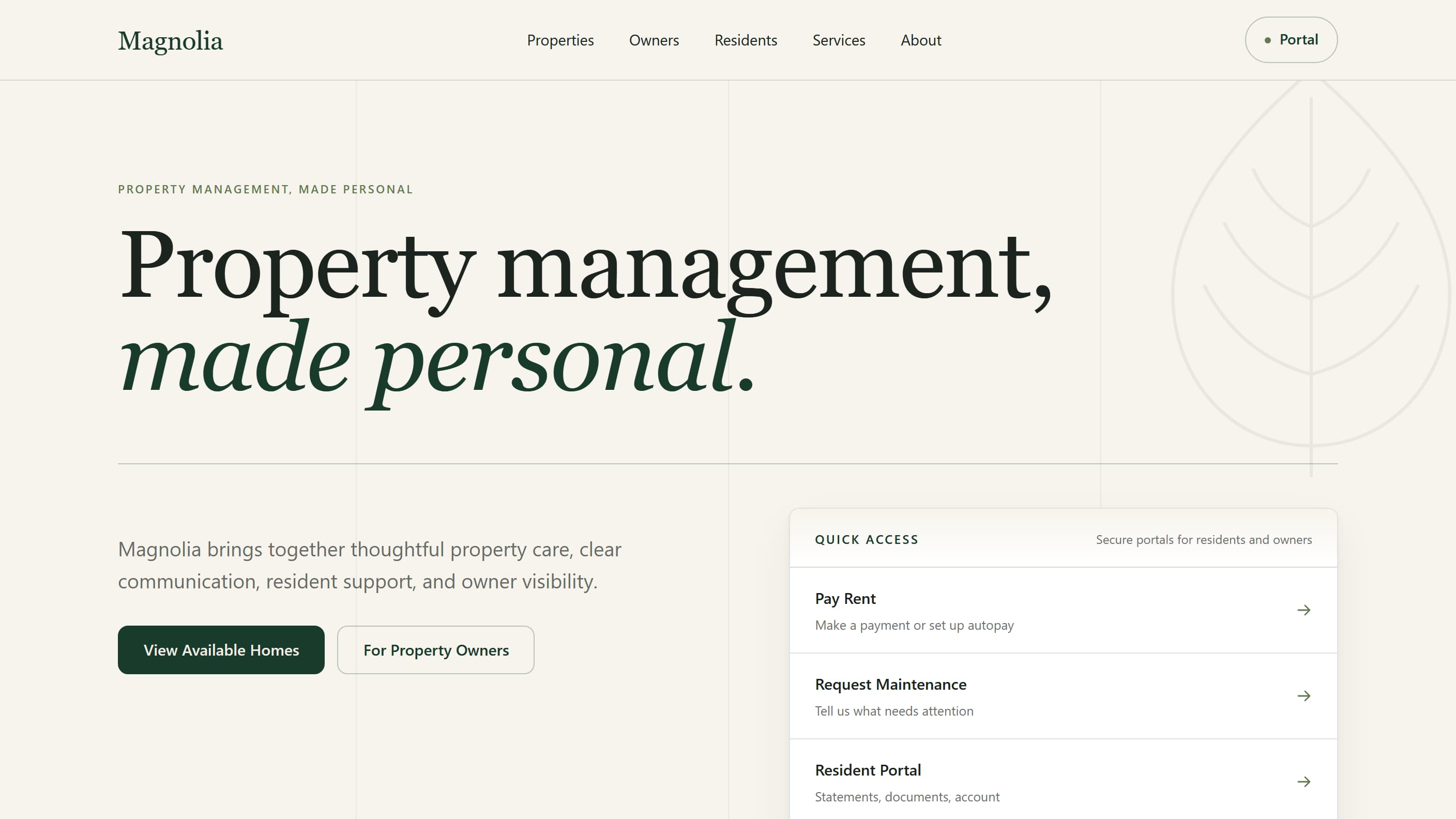
Magnolia Property Management Platform
Platform architectureMagnolia is a property-management platform with four working parts: a public rental website where people browse and filter available homes and open a page for any property or unit; resident and owner entry points covering things like paying rent, maintenance requests and statements; a management system where a team publishes listings, sees what is live and what still needs attention, and decides what goes public; and a reviewed bulk import for a portfolio that already lives in a spreadsheet. Underneath, a whole rental property and an individual unit are kept as separate records, each holding what is genuinely true of it — and both produce the same kind of listing page, which means one set of pages to build and maintain instead of two. The platform runs on its own records rather than inside a property-management vendor's product, so an outside system can be connected later through an adapter without rebuilding the website or the CMS. No provider integration is implemented today. It is built to be reused across rental portfolios rather than made once for a single address.
- Interface type
- Property Management Platform
- Technical role
- Strategy, UX, Architecture, Development
- What it addresses
- Property websites usually assume a listing is a building. The moment a property has separately rentable units, that assumption forces duplicate content types, parallel templates and two publishing workflows that drift apart — and modeling the portfolio inside a property-management vendor's product hands the business's own domain to that vendor's roadmap and export format.
- Built with
- Next.js · React · TypeScript · Sanity · Vercel
Magnolia is WebCraft Labz’s own platform work, built and deployed to show how this kind of system should be structured — not a client engagement, and not a product with customers. No usage, revenue or performance result is claimed for it.
Selected work
Interfaces, at different stages
Candy Shoppe is a business demo — deployed, working, and clickable, rather than screenshots of a concept. Dark Money is still in development: the public page is live, but the application sits behind sign-in, so the capture below is that page rather than the workspace. Each project’s status is on its caption, and the full record is in the portfolio.
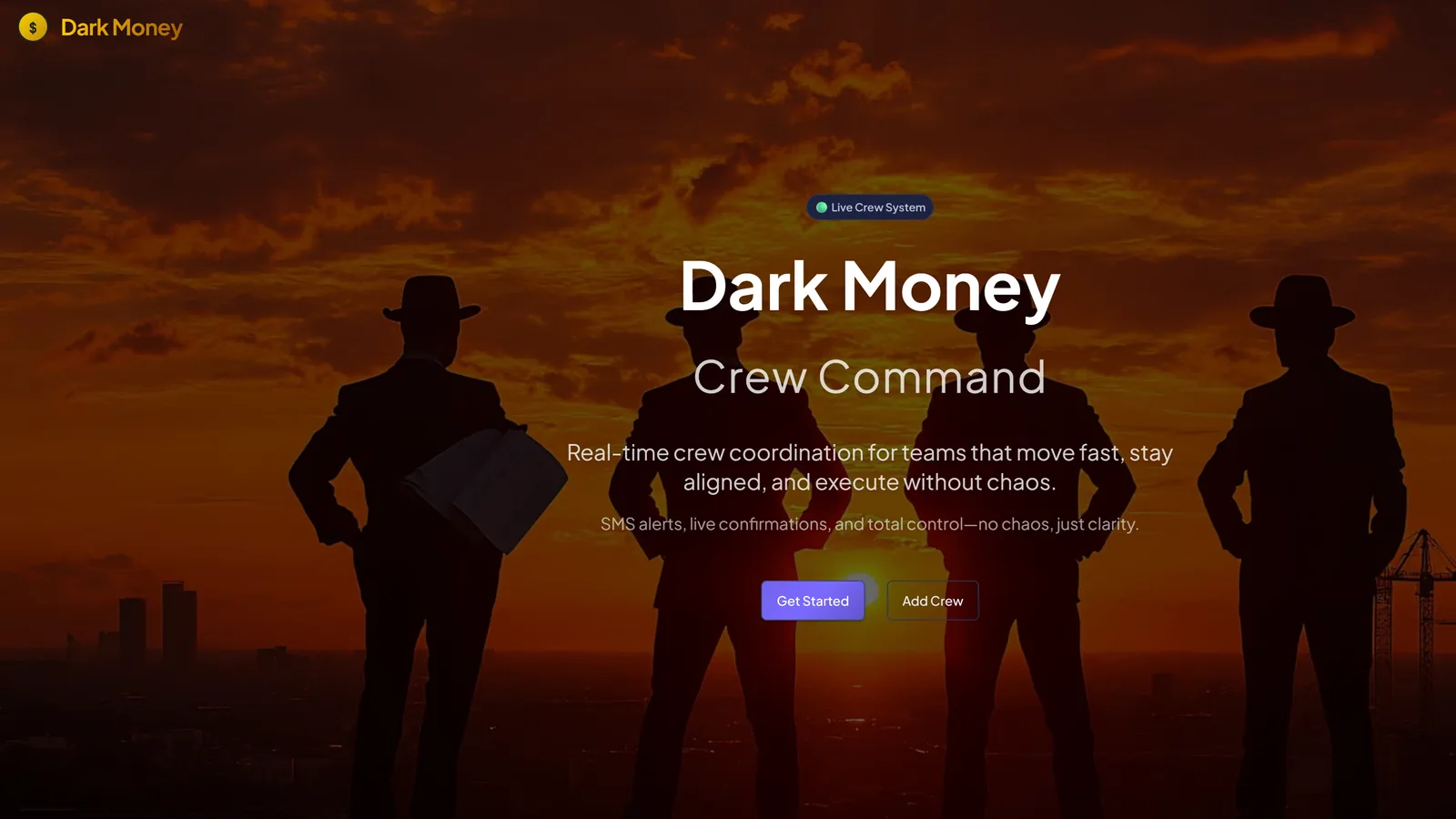
Dark Money — Crew operations platform 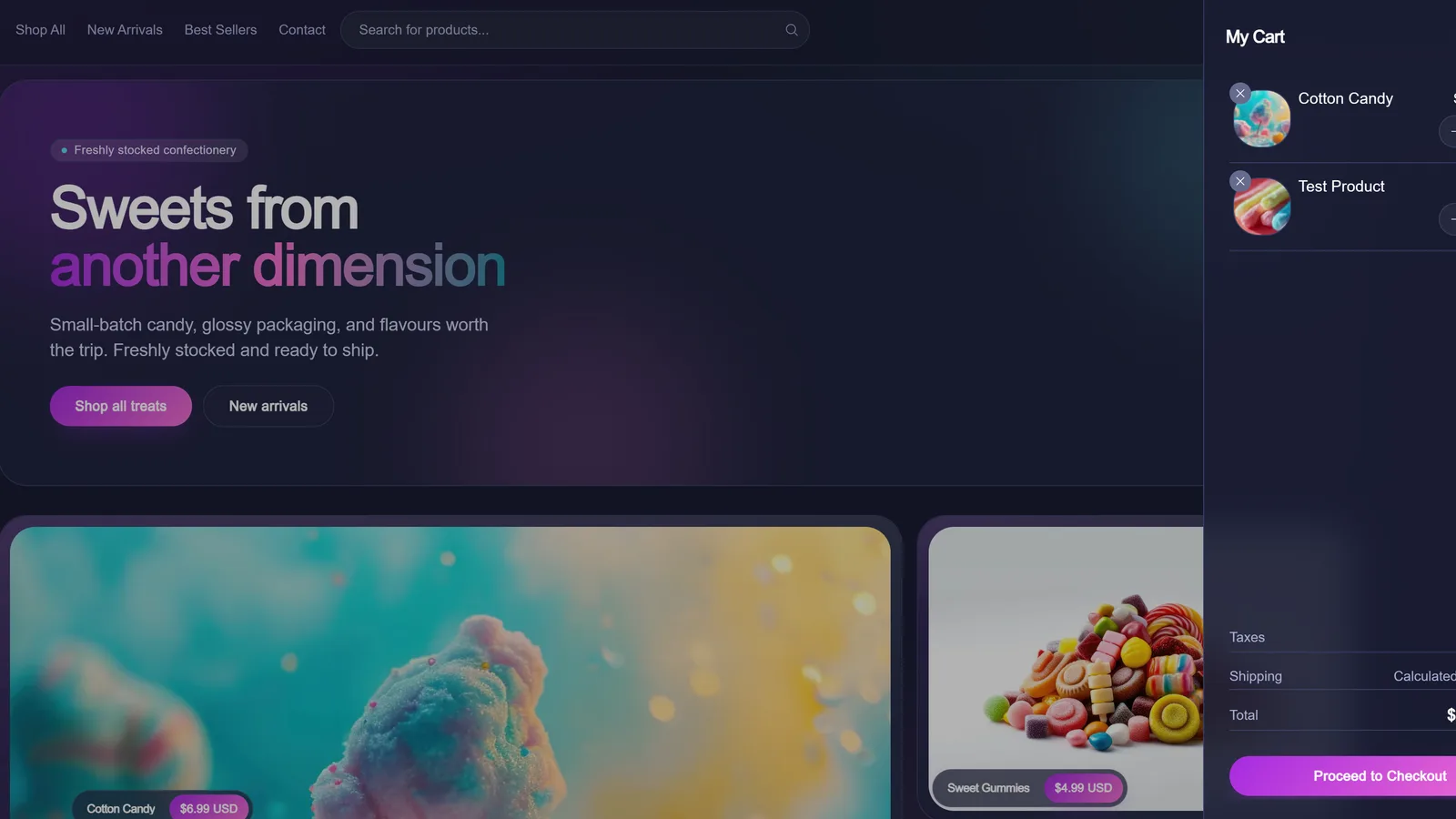
Candy Shoppe — Headless ecommerce storefront demo
What we build against
The existing process is the specification, whether or not anyone has written it down.
Including the parts happening in spreadsheets, inboxes, and phone calls.
Data-driven interfaces
Data becomes useful when people can act on it
Most organizations are not short of information. They are short of a way to find, understand, and act on the information they already hold — which is an interface problem and a data-modelling problem at the same time.
REST APIs
Both consuming them and building them — a considered contract rather than whatever the front end happened to need that week.
Databases
A schema modelled on the real entities and their relationships, which is what makes everything above it possible.
Structured datasets
Taking a spreadsheet, an export, or a legacy table and giving it a shape an interface can query.
Search
Querying against the real dataset, with results that behave sensibly when nothing matches.
Filtering & sorting
Controls built from the data's actual dimensions, with the applied state visible and shareable as a URL.
Map & location data
Coordinates, boundaries, and distance treated as queryable data rather than a pin dropped on a picture.
Third-party systems
Reading from services the organization already pays for, instead of asking staff to re-enter what is already there.
External data sources
Public datasets and partner feeds, normalised into something the interface can rely on.
Refreshed on a schedule
Periodic syncs where data changes slowly, and live reads where it does not — decided per source rather than by default.
Integrations
Working with what you already run
An application that duplicates data the organization already holds creates a second version of the truth. Most of this work involves deciding which system stays the authority for each piece of information, and then connecting to it rather than copying it.
These are categories of system we integrate with, scoped per project against whatever you actually run — not a list of pre-built connectors.
UX before code
The hard part is not making it work
It is making the workflow understandable. An application that does everything and explains nothing gets abandoned in favour of the spreadsheet it replaced.
Task flows
The actual route from intent to done, mapped before any screen is designed — including the routes people take when the first one fails.
Information architecture
What the entities are, how they relate, and what a person calls them, which is frequently not what the database calls them.
Interface states
- Loading
- Saving
- Saved
- Failed
- Partially complete
Most applications are designed only in their success state.
Error handling
Messages that say what went wrong and what to do next, placed where the problem is rather than at the top of the page.
Empty states
The first screen a new user sees is usually empty. It should explain the tool, not show an apologetic blank panel.
Form design
Grouping, order, defaults, and validation timing — the difference between a form people finish and one they abandon.
Mobile use
Assuming a phone rather than treating it as the degraded case, because for public-facing tools it is the majority case.
Accessibility
Keyboard operation, focus order, labelled controls, and announced state changes — harder in an application than on a page, and more important.
Navigation
Knowing where you are in a system with more than one section, and how to get back out.
Permissions & roles
Designing what each role sees, not only what each role is allowed to do — an empty screen and a forbidden one are different experiences.
One application type
SaaS products, where the project calls for one
We also build SaaS products and subscription-based applications. It sits here as one kind of application among several, rather than as the thing the studio is organised around.
Worth reading first: MVP vs. prototype vs. production.
Account systems
Sign-up, sign-in, organizations, and the difference between a user and the account they belong to.
Subscription workflows
Plans, upgrades, downgrades, and the states in between, through an established billing provider.
Customer dashboards
The signed-in product surface — the thing subscribers are actually paying for.
Administrative tools
The internal side needed to support customers once there are customers to support.
Product interfaces
The core feature set, scoped so the first version proves the idea rather than pre-building for a scale nobody has yet.
Integrations
The connections a product needs to fit into the tools its customers already use.
Technology
Chosen around the system, not the stack
Technology should be selected around the users, the project requirements, maintainability, and the expected lifespan of the system. We are not a single- framework studio, and the right answer is regularly the less interesting one.
How we weigh those trade-offs is written up in the Developer Stack Library.
How a project runs
Workflow first, then data, then screens
Five stages, in the same order every time.
Workflow discovery
How the task is done today, including the parts happening in spreadsheets, inboxes, and phone calls. The existing process is the specification, whether or not anyone has written it down.
Flows & data model
Task flows, entities, relationships, roles, and states. What the application is, decided before what it looks like.
Interface design
Screens designed with their empty, loading, error, and permission-denied states, not only the version where everything works.
Build & integrate
Production development against the real data and the real systems it has to talk to, rather than against fixtures that flatter the design.
Launch & iterate
Real users, real data volumes, and the adjustments that only become obvious once people are relying on it.
Questions
What organizations usually ask first
How do I know if we need an application rather than a website?
The test is whether people need to do something or read something. If visitors search, submit, book, track, or sign in to see information specific to them, that is application work. If they need to read, understand, and contact you, a well-built website is cheaper and better. Plenty of projects that arrive described as an application turn out to need a good website with one or two interactive pieces, and we will say so.
Can you replace a process that currently runs on spreadsheets?
That is one of the most common versions of this work. The spreadsheet is usually an accurate specification of the process — including the parts nobody documented — so we start by understanding how it is actually used, including the workarounds. The goal is to keep what works about it and remove the manual coordination around it.
Do you build public-facing tools for organizations?
Yes — directories, facility and service finders, maps, calendars, program finders, request intake, and booking are all application work of this kind. These are project types we build, and we would scope any one of them from your actual data and audiences. Our verified project record, labelled for what each thing genuinely is, is in the portfolio.
Can users have accounts and sign in?
Yes. Accounts, roles, and permissions are a normal part of this work, designed into the application so an unauthorised action is refused by the system rather than merely hidden. Formal security certification, penetration testing, and compliance audit are specialist disciplines we would bring in rather than claim in-house, and we will tell you directly when a project needs that.
Can it connect to the systems we already use?
Usually, and it generally should. We work against REST APIs, databases, CMS platforms, CRMs, booking platforms, payment services, analytics, and external datasets. Establishing what data has to move where — and which system stays the authority for each piece of it — is part of discovery, before anything is built.
Do you still build SaaS products?
Yes. Subscription products, account systems, customer dashboards, and the admin tooling around them are all part of this. SaaS is one application type among several rather than the whole of what we do, and scoping a first version around the core value instead of a full feature set still applies.
What drives the cost and timeline?
Number of distinct user roles, complexity of the data model, how many external systems it has to integrate with, and how much of the workflow has genuine edge cases. A single-role internal tool is a much smaller project than a multi-role portal with payments and three integrations. We give a realistic range after discovery, not before understanding the workflow.
Related capabilities
Where this connects
Application work rarely stops at the application. These are the capabilities it most often runs into.
Websites & Digital Platforms
When the answer is a website after all — information, services, and content structured around several audiences.
Websites & Digital Platforms →UX, Information Architecture & Accessibility
Task flows, interface states, and accessible patterns — the part of application work that decides whether it gets used.
UX, Information Architecture & Accessibility →Content, Data & Platform Systems
Databases, APIs, migrations, and integrations — the data layer an application sits on.
Content, Data & Platform Systems →AI & Automation
Where a step inside the workflow is repetitive enough to automate, or unstructured enough to genuinely need an AI-assisted approach.
AI & Automation →Selected work
Live sites, business demos, and platforms in development, each labelled for what it actually is.
Selected work →All capabilities
The four primary capability areas and the specialised work alongside them.
All capabilities →
Related reading
MVP vs. Prototype vs. Production Application
What separates the three, and which one you actually need before scoping a build.
Read the guide →Custom Software vs. Off-the-Shelf Tools
A framework for telling when you have genuinely outgrown off-the-shelf tools.
Read the guide →What Drives the Cost of a SaaS MVP in 2026?
What actually moves the number, without a generic price table.
Read the guide →
Las Vegas & Nevada
Start a project
Describe the workflow, not the software.
A process running on spreadsheets, a directory nobody can search, a booking system that is really an inbox, or a product idea that needs a first version — tell us how it works today and we'll tell you straight what it takes.