
Content, Data & Platform Systems
The infrastructure behind the interface.
Digital platforms depend on more than the screens people see.
WebCraft Labz designs the content models, CMS architecture, data relationships, integrations, and publishing systems that help websites and applications remain manageable as they grow.
The system behind the screen
The interface is one layer of several
A platform becomes difficult to maintain when its content and data have no clear structure underneath them. The symptoms show up in the interface; the causes are almost always down here.
Store
Content
Pages, records, and the material people came for — ideally modelled, not just typed into a box.
Structured records
Locations, programs, staff, documents — the things that are not really pages at all.
Media
Images, files, and documents, with the versions, sizes, and permissions that come with them.
Databases
Where the structured parts live, and where the relationships between them are enforced rather than remembered.
Describe
Metadata
The descriptive layer that makes filtering, sorting, search, and reuse possible in the first place.
Serve
APIs
How the content and data get out to the things that display them, including things that do not exist yet.
Search indexes
A separate representation of the content, built for querying rather than for reading.
Operate
CMS platforms
The system the people who maintain the content actually log into, several times a week, for years.
User roles
Who can see what and who can change what, expressed as configuration rather than as a policy nobody reads.
Publishing workflows
Draft, review, schedule, publish, retire — the path a piece of content takes through the organization.
Connect
Third-party systems
The tools the organization already pays for and is not going to stop using because of a redesign.
Structured content
One record, or one hand-built page
This is the decision that most affects what a platform can do later, and it is made early, quietly, and usually by default. Take a park. Built as a page, it is a page. Modelled as a record, it has fields:
Name
The identifier a person uses, which may differ from the official designation.
Address
Structured into its parts, so it can be formatted, mapped, and matched.
Hours
Real opening data, including seasonal variation and exceptions — not a sentence.
Amenities
A controlled list, so "restrooms" means the same thing across every record.
Coordinates
Latitude and longitude, which is what makes "nearest" and "within this area" possible.
Images
With alt text and credit attached to the image rather than to the page it appears on.
Accessibility information
Specific and structured, so it can be filtered on rather than buried in a paragraph.
Programs
A relationship to other records, not a re-typed list that drifts out of date.
Contact details
Owned once, so a change updates every place the record appears.
The same record can then appear as
A directory
The full list, browsable and sortable, without anyone hand-maintaining an index page.
A map
The same records plotted, with the list and the map showing the same filtered set.
Search results
Indexed on its real fields, so a query can match an amenity and not only a title.
Filtered listings
"Open now, has restrooms, wheelchair accessible" — a query, not a curated page.
Detail pages
One template rendering every record consistently, instead of a hundred hand-built pages.
Related-content modules
Surfacing nearby locations or connected programs automatically, from the relationships.
A park is only the clearest example — it is a demonstration of modelling rather than a description of a system we have built; our verified record is in the portfolio. The same reasoning applies to anything an organization has a lot of:
CMS architecture
The best CMS is not the newest one
It is the one that fits the publishing team, the content model, the integration needs, and the expected lifespan of the platform. Technology is the consequence of those four things, not the starting point.
Traditional CMS
What it holds
Content and presentation together
Earns its place when
One site, one editing team, and editing that has to feel familiar
In practice
Content and presentation in one system. Familiar to editors, quick to stand up, and entirely adequate for a great many organizations.
Headless CMS
What it holds
Content only, delivered over an API
Earns its place when
More than one thing consumes the same records
In practice
Content managed separately from where it is displayed, delivered over an API. Useful when more than one thing consumes it.
Hybrid approaches
What it holds
Both — one system runs the site and exposes an API
Earns its place when
Most of the site is conventional and some of it has to be reused
In practice
A conventional CMS running the site while exposing structured content over an API for the pieces that need it. Often the pragmatic answer.
Built either way
These are not further architecture options. They are what proper implementation looks like whichever of the three you land on.
Custom content models
Defining the entities and fields around the organization's actual material, rather than forcing everything into pages and posts.
Reusable blocks
Components an editor can assemble, constrained enough that every page stays consistent and accessible.
Editorial workflows
Draft, review, schedule, publish — modelled on how the organization actually signs things off.
Permissions
Role separation where several teams publish into one platform, so ownership is enforced rather than agreed.
WordPress
Often the right answer, and we build it properly
WordPress runs a very large share of the organizational web for good reasons. Where it fits, we build on it deliberately rather than treating it as the compromise option.
Editorial websites
Publishing is what it was built for, and the editing experience is genuinely good at it.
Public-facing organizational sites
Well-understood, widely supported, and straightforward to hand to a team that has to run it for years.
Teams already fluent in it
Existing familiarity is a real asset. Migrating a confident team onto an unfamiliar system can cost more than it returns.
Broad plugin requirements
Where an ecosystem of existing solutions genuinely covers the requirement, building the same thing from scratch is hard to justify.
Conventional publishing workflows
Roles, drafts, revisions, and scheduling are mature and available without assembling them yourself.
Ownership and familiarity matter
Sometimes the deciding factor is that the organization can hire for it and is not dependent on one agency.
What we build on it
Custom themes
Built for the organization rather than a purchased theme bent into shape and then hard to update.
Custom templates
Per content type, so a location renders as a location rather than as a slightly unusual blog post.
Structured fields
Real fields per content type instead of everything living in one rich-text editor.
Reusable blocks
A constrained block library, so editors compose pages without being able to break the design or the markup.
Accessibility-focused implementation
Semantic templates, heading structure, and keyboard-operable components — WordPress does not prevent accessibility, themes do.
Integrations
Connecting it to the systems the organization already runs, through its APIs rather than through copy-paste.
Migrations
On to it, off it, or between versions — with URLs, media, and metadata carried across deliberately.
Performance work
Query, asset, and caching work on sites that have accumulated a decade of plugins.
Headless & Sanity
When separating content from presentation pays for itself
Headless systems — Sanity among them — solve a specific problem: content that has to reach more than one place. That is a real problem for some organizations and an imaginary one for others.
Content feeds several interfaces
A website, an application, and possibly a screen or a partner feed, all reading the same records.
Content is highly structured
When the material is genuinely records with fields rather than documents, a content API fits it better than pages do.
Site and application share information
The public site and the signed-in tool describing the same programs, without two copies drifting apart.
Content appears in several places
One item surfacing in a listing, a detail page, a search result, and a related module — authored once.
A custom front end is required
Where the interface needs more control than a theme layer gives, and the CMS should stop dictating the markup.
Large reusable content models
Many types with real relationships between them, where the modelling itself is the substantial part of the work.
From the work
Two record types, one listing shape
A platform annotated for how it is put together rather than how it looks, with the full architecture written up behind it.
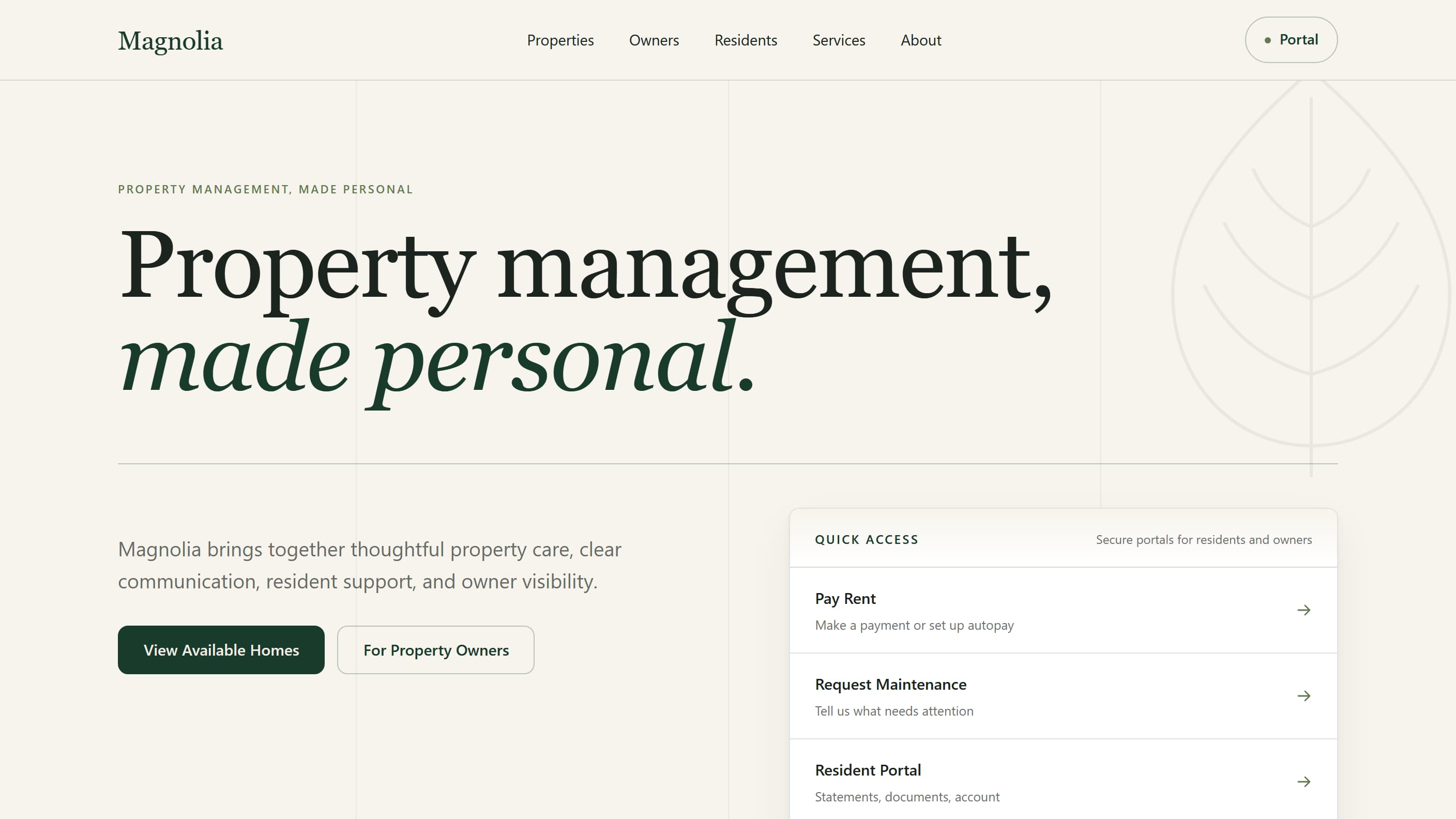
Magnolia Property Management Platform
Platform architectureMagnolia is a property-management platform with four working parts: a public rental website where people browse and filter available homes and open a page for any property or unit; resident and owner entry points covering things like paying rent, maintenance requests and statements; a management system where a team publishes listings, sees what is live and what still needs attention, and decides what goes public; and a reviewed bulk import for a portfolio that already lives in a spreadsheet. Underneath, a whole rental property and an individual unit are kept as separate records, each holding what is genuinely true of it — and both produce the same kind of listing page, which means one set of pages to build and maintain instead of two. The platform runs on its own records rather than inside a property-management vendor's product, so an outside system can be connected later through an adapter without rebuilding the website or the CMS. No provider integration is implemented today. It is built to be reused across rental portfolios rather than made once for a single address.
- Architecture
- Property and Unit are separate records; the public listing is derived, never authored twice
- One normalized PublicListing shape, so presentation never asks which source it came from
- Provider adapters are a boundary layer — the only place allowed to know a vendor exists
- Portal capabilities resolve to destination types rather than to vendor-specific pages
- Built with
- Next.js · React · TypeScript · Sanity · Vercel
Magnolia is WebCraft Labz’s own platform work, built and deployed to show how this kind of system should be structured — not a client engagement, and not a product with customers. No usage, revenue or performance result is claimed for it. The verified record is in the portfolio.
Data architecture
Fewer exceptions for the interface to solve
Good data architecture reduces the number of special cases everything above it has to handle. Most interface complexity that feels unavoidable is a modelling decision showing through.
Entities
The things the platform is actually about — a program, a location, a document — named and defined once.
Relationships
Which entities connect to which, so a change in one place propagates instead of needing to be repeated.
Categories
The primary grouping, kept small and stable enough that people learn it.
Taxonomies
Controlled vocabularies, so the same concept is not entered five different ways across a thousand records.
Identifiers
A stable id per record, which is what lets URLs, redirects, and integrations survive a rename.
Metadata
The descriptive layer filtering, sorting, and search are built on top of.
Relational data
Where the relationships matter enough to be enforced by the database rather than by convention.
Filtering & sorting
Possible only where the underlying fields exist — which is a modelling decision made long before the interface.
Lookup tables
Shared reference lists that several content types draw from, defined in one place.
Geographic data
Coordinates and boundaries as real data, so distance and area are queries rather than manual groupings.

APIs & integrations
Keep the systems that work, improve what sits in front of them
Integration lets an organization present information through a better interface without abandoning the systems already holding it. The useful question is which system stays the authority for each piece of data.
These are categories of system we integrate with, scoped per project against what you actually run — not a list of pre-built connectors.
REST APIs
Consuming them, and building them — a considered contract rather than whatever the front end needed that week.
Third-party platforms
Systems the organization already runs, kept as the authority for the data they own.
External datasets
Public data and partner feeds, normalised into a shape the platform can rely on.
CRM systems
So a form submission lands where the people who handle it already work.
Scheduling systems
Presenting real availability rather than a static page that says to call.
Payment services
Through an established provider — the integration is ours, the payment infrastructure is theirs.
CMS APIs
Reading content out of the editing system into whatever needs to display it.
Analytics
Events defined around the actions that matter, so the numbers answer a question someone asked.
Existing internal systems
Often the most valuable integration available, and the one most redesigns skip.
One source, many experiences
Authored once, read anywhere
The practical payoff of everything above: a correction made in one place is correct on every surface, including the ones that do not exist yet.
CMS & data
Where content and records are authored and stored once, with their structure and relationships defined.
API
A stable contract for getting it out, so a new consumer does not require re-entering or re-modelling anything.
Website · app · search · directory · dashboard
Every surface reading the same records. A correction made once is correct everywhere, including on surfaces built later.
Search infrastructure
Search quality depends on what is being searched
This is the layer underneath a search experience. How the results are presented and filtered is UX and information architecture — whether those results can be good at all is decided here.
Searchable records
Content stored as fields rather than as a wall of markup, which is what makes matching on the right thing possible.
Structured metadata
The descriptors a query can actually filter and rank on.
Indexing
A representation built for querying, kept in step with the content as it changes.
Tags & categories
Applied from a controlled vocabulary, otherwise the filter list grows to hundreds of near-duplicates.
Filters
Each one is a field that had to exist in the model first. Filters cannot be added to content that has no structure.
Content relationships
What lets results show related items rather than only exact matches.
Document libraries
Files with real metadata — type, date, department, status — so they are findable without knowing who published them.
Directories & resource centers
Collections whose entire usefulness depends on the model underneath them.
Archives
Older material kept indexed and citable rather than quietly dropped at the next migration.
Why migration is the project
Moving bad structure into a new CMS gives you the same problem in a newer box.
Content migration
Not copying pages from one box to another
A migration is where content actually gets audited, reduced, and remodelled — which is why it is usually the most valuable stage of the project.
Content inventory
Everything that exists, with traffic and last-updated dates against it. This is where most of the real decisions get made.
Mapping to the new model
Deciding what each old page becomes — a record, a section of one, or nothing at all.
Cleanup
Out-of-date, superseded, and orphaned content identified and dealt with rather than carried over by default.
Deduplication
Three near-identical pages resolved into one authoritative record, with an explicit decision about which one wins.
Redirects
Every URL that changes, mapped — the single most common cause of a rebuild losing its search rankings.
Metadata preservation
Publish dates, authors, and descriptions carried across rather than reset to the migration date.
Files & media
Documents and images moved with their references intact, including the ones linked from inside body content.
URL mapping
A deliberate new structure, rather than whatever the new CMS generates by default.
Validation
Automated checks against the real migrated set — counts, broken links, missing media — not a spot check of ten pages.
Editorial review
The people who own the content confirming it arrived correctly, before the old system is switched off.
Legacy modernization
Replace the weak layer, keep the sound one
Older systems are rarely uniformly bad. The interface layer is often what has aged, while the database and business logic underneath still do their job — and replacing everything at once is the most expensive way to find that out.
Older CMS platforms
Systems still running and still holding real content, where the cost is in editing rather than in serving.
Brittle templates
Layouts where a routine change risks breaking something unrelated, so routine changes stop being made.
Duplicated content
The same information in several places, each partly maintained, none clearly authoritative.
Outdated front ends
Frequently the right thing to replace first, precisely because the system behind it is still sound.
Manual workflows
Steps done by hand because connecting two systems was never scoped, and a person became the integration.
Hard-coded content
Information living in templates instead of in the CMS, so updating it needs a developer.
Disconnected systems
Several tools holding overlapping data with no agreement about which one is right.
Performance issues
Usually accumulated rather than designed in, and usually traceable to a small number of causes.
Editorial workflows
Designed for the people who maintain it
A platform is used far more by the team publishing into it than by any individual visitor. Friction here compounds daily, and it is the main reason content stops being updated.
Drafts & review
Work in progress that is genuinely not public, and a review step that matches how the organization signs things off.
Content ownership
A named owner per area, so nothing sits un-updated because everyone assumed someone else had it.
Reusable content
Write it once, reference it everywhere. Contact details and opening hours should never be typed twice.
Scheduled publishing
Things going live at the right time without anyone logging in at seven in the morning to do it.
Structured inputs
Fields, pickers, and controlled lists instead of a free-text box, which is what keeps a thousand records consistent.
Role separation
Several departments publishing into one platform without being able to alter each other's areas.
Technology
Selected from the requirements, in that order
We work across conventional and headless systems and do not have a house answer. The content model, the publishing team, the integrations, and how long the platform has to last are what decide it.
How we weigh those trade-offs is written up in the Developer Stack Library.
Especially useful for
Where the model is the project
Project types this capability is built for. Our verified record of what we have built, labelled for what each thing actually is, is in the portfolio.
Content-heavy websites
Where the volume is what makes the site hard to run, not the design.
Public & municipal websites
Many services and departments publishing into one platform.
Nonprofit platforms
Programs, resources, and events maintained by a small team.
Education sites
Large bodies of content that grow every term and are owned by many people.
Directories & resource centers
Collections whose usefulness depends entirely on the model underneath.
Document libraries
Files with real metadata, findable without knowing who published them.
Editorial publications
Regular publishing with review, scheduling, and archives that stay reachable.
Portals & internal systems
Where structured data and role-based access are the substance of the build.
Multi-site organizations
Shared content across several properties, authored once.
Years of legacy content
Where the migration is the project and the new design is the visible part.
How a project runs
Inventory, model, architect, connect, migrate, validate
Six stages. The first two decide almost everything, and they are the two most often compressed to make room for the visible work.
Inventory
Everything that exists, where it lives, who owns it, and what actually gets used. Nothing else can be decided honestly without this.
Model
The entities, fields, and relationships. The decision that determines what the platform can do for the next several years.
Architect
Which system holds what, which one is the authority for each piece of information, and how editors will work in it day to day.
Connect
APIs and integrations to the systems that stay, so the platform reads from them rather than keeping a second copy.
Migrate
Content mapped, cleaned, deduplicated, and moved, with URLs redirected and media carried across intact.
Validate
Automated checks across the real migrated set plus editorial review by the people who own the content — before the old system is switched off.
Questions
What organizations usually ask first
Do we need a headless CMS?
Frequently not. Headless earns its place when content feeds more than one thing — a site and an application, or a site and a partner feed — or when the material is genuinely structured records with real relationships. For a single site with one editing team, it adds a moving part without a matching return, and a conventional CMS is the better answer. We decide this from your publishing situation, not from a preference.
Do you work with WordPress?
Yes, properly rather than reluctantly. Custom themes and templates, structured fields, a constrained block library, accessibility-focused implementation, integrations, migrations, and performance work on sites carrying a decade of plugins. For editorial sites and for teams already fluent in it, WordPress is often the correct choice, and we will say so even when a more novel option would be more interesting to build.
What is structured content, in plain terms?
It means storing a thing as its parts rather than as one block of text. A location stored as name, address, hours, coordinates, amenities, and accessibility information can appear in a directory, on a map, in filtered results, and on its own page — all from one record. The same location written as a hand-built page can only ever be that page, and every listing of it has to be maintained separately.
How risky is a content migration?
The risk is well understood, which is why it gets its own stage rather than being a step at the end. The two things that actually go wrong are lost search rankings and lost media references, and both are prevented by mapping every URL that changes and moving files with their in-content references intact. Validation runs against the full migrated set, and the old system stays up until the people who own the content have confirmed it arrived correctly.
Can we keep systems we already use?
Usually, and often you should. A booking system, CRM, or internal database that works is an asset, and the useful question is which system stays the authority for each piece of information. A lot of modernization work is replacing a weak interface layer while leaving a sound back end in place, rather than replacing everything at once.
Why does search on our site return nothing useful?
Almost always because of what is being searched rather than the search itself. If content is stored as undifferentiated pages, a query has nothing specific to match against and no fields to filter or rank on. Improving search usually means structuring the content first — which is the same work that makes listings, filtering, and reuse possible.
Related capabilities
Where this connects
This is the layer the other three are built on. It rarely ships alone.
Websites & Digital Platforms
The public-facing platform this infrastructure supports — redesigns, rebuilds, and content-heavy organizational sites.
Websites & Digital Platforms →Applications & Digital Tools
Dashboards, portals, and directories — the interactive surfaces that read from these models.
Applications & Digital Tools →UX, Information Architecture & Accessibility
The other half of structure: how people navigate and understand what this layer holds.
UX, Information Architecture & Accessibility →Technical SEO & Performance
Where migrations meet rankings — URL mapping, redirects, and crawlable structure.
Technical SEO & Performance →All capabilities
The four primary capability areas and the specialised work alongside them.
All capabilities →
Related reading
Developer Stack Library
How we weigh stack decisions, published so the reasoning can be checked rather than taken on trust.
Read it →The Solo SaaS Stack
Framework, database, auth, hosting, and operations, with the tradeoffs stated rather than assumed.
Read it →Commerce 101: A Beginner's Guide to Selling Online
What hosted, no-code, and headless actually mean in practice, explained without the jargon.
Read it →
Start a project
Tell us what the content is doing to you.
A CMS nobody wants to open, the same information maintained in four places, a migration that has been postponed twice, or a search box that returns nothing useful — describe it and we'll tell you straight what it takes.