Legacy Systems: What to Keep, What to Replace, What to Retire
Old technology is not automatically bad technology. This guide shows how to evaluate legacy systems by the jobs they perform, the dependencies around them, their strategic fit, and their future cost, then decide whether to keep, integrate, replace, or retire them.
Every old system eventually gets blamed for something.
The accounting platform feels dated. The CRM is awkward. The scheduling tool does not talk to anything else. A spreadsheet has somehow become operational infrastructure. Someone suggests automation, someone else suggests replacing the whole stack, and before long the conversation has turned into a software shopping exercise.
That is usually where modernization goes sideways.
The age of a system tells you surprisingly little about whether it should survive.
Some twenty-year-old systems quietly perform one job extremely well. Some platforms bought last year already create more friction than they remove. A clumsy internal database may contain years of operational knowledge that would be difficult to reconstruct, while a polished SaaS product can force the business into workflows that no longer make sense.
The useful question is not how old a system is.
It is what role the system still plays, what depends on it, and what would happen if it disappeared tomorrow.
Modernization is not a purge. It is a series of decisions about what deserves to remain.
Understand the System Before You Judge It
Legacy Does Not Mean Useless
"Legacy system" has become shorthand for obsolete technology.
That is too simple.
A legacy system is usually a system that has accumulated history: customer records, financial data, workflows, business rules, documents, permissions, integrations, and institutional knowledge.
Some of that history is valuable. Some of it is technical debt. Most organizations have both tangled together.
That is why replacing a legacy platform can be far more dangerous than buying a new one.
From the outside, a system may look like a database. Inside the business, it might store customer information, trigger invoices, produce reports, feed another application, and hold the only complete record of certain transactions.
And somewhere in a corner, someone downloads a CSV every Friday and copies three columns into another system by hand because an integration stopped working in 2019 and nobody remembers why.
None of that appears on a vendor comparison chart.
Before deciding what should replace a system, you have to understand what the system has become.
Start With the Job, Not the Software
Organizations often evaluate systems backward.
They start with products: should we replace Salesforce, move off WordPress, switch accounting platforms, or build something custom?
But software names are not business architecture.
Start with the job instead.
What is this system responsible for? What information does it own? Who depends on it? What feeds into it? Where does its output go? Which processes stop if it disappears?
A system that looks inefficient may simply be sitting in the middle of an inefficient workflow.
Replace the software without changing the workflow and you move the same problem into a newer interface. That is how companies spend six months migrating and end up with better software while everything still feels strangely complicated.
The complexity was never only in the tool.
It was in the way the business had grown around it.
The Most Dangerous System Is Often the One Nobody Owns
The obvious legacy platforms get attention: the ERP, the CRM, the website, the accounting software.
Some of the highest-risk systems are much smaller.
A spreadsheet an employee built seven years ago. An Access database sitting on a shared drive. A no-code automation nobody documented. A plugin authenticated with an API key belonging to someone who left the company. A script running on a server nobody remembers provisioning.
These become invisible infrastructure.
They rarely appear on architecture diagrams because officially they are not architecture. The business depends on them anyway.
This is why System Archaeology: How to Map What Your Business Actually Runs On comes before modernization.
You cannot decide what to replace until you know what exists, and you will not discover that by reading the software charges on the company credit card.
You have to follow the work.
Evaluate What Still Belongs
Technically Fine, Strategically Wrong
Once you understand what a system actually does, you can start judging whether it still belongs.
The hardest cases are often the ones where nothing appears broken.
Users know how to operate it. The vendor still supports it. Performance is acceptable. The reports still run.
And yet the system increasingly limits what the organization wants to become.
The business wants customer self-service, but the system cannot expose the necessary data. Leadership wants real-time reporting, but information arrives only through nightly exports. The company wants AI-assisted workflows, but the underlying data is inconsistent and trapped inside proprietary structures. Every new service requires another customization to a platform designed for a different business model.
The system is not failing.
The strategy has moved past it.
Technical health asks whether the system still works.
Strategic fit asks whether the system still supports where the organization is going.
A system can pass the first test and fail the second.
That distinction matters because organizations themselves can outgrow the assumptions they were built around. Your Company Was Designed for a World That No Longer Exists looks at the same problem from the organizational side.
The Evidence Worth Gathering
Before deciding what to do with a system, gather evidence around a handful of practical questions.
Dependency depth: How many people, processes, and other systems rely on it? How many of those dependencies are documented?
Integration ability: Can it exchange information cleanly, or does data move through exports, copy-and-paste work, brittle scripts, and manual re-entry?
Data quality: Is the information trustworthy, complete, and portable? Can you actually get it out?
Security and support risk: Is the platform still supported? Does it receive updates? Can it meet current security, privacy, and compliance requirements?
Operating cost: Look beyond the license. How much staff time, duplicate entry, maintenance, troubleshooting, and specialized knowledge does it consume?
And then there is strategic fit.
Does the system support what the business wants to become next?
Do not turn these into a weighted score.
A system does not become a keeper because somebody calculated 62 points instead of 58. Debating whether its data quality deserves a six or a seven creates precision without necessarily creating judgment.
Use the evidence to answer better questions.
Do not use the score to replace judgment.
The Cost You Don't See
Legacy systems create a strange accounting problem.
The cost of keeping them arrives in small pieces: a little maintenance, some manual entry, an export somebody cleans up every week, the one developer who still understands how the old system works, an integration that breaks every few months, another workaround, another spreadsheet.
Each cost looks manageable by itself.
Replacement arrives as one large number.
That makes the old system feel cheaper than it really is.
A fair comparison looks at total future cost.
What will this system cost to operate for another three years? How much staff time does it consume? How much duplicate work does it create? How much risk comes from unsupported technology? What happens every time the business needs to change a workflow, add a service, connect another application, or expose data somewhere new?
And there is another cost that rarely appears in a budget:
What can the organization not do because this system is still there?
That may be the largest cost of all.
Make the Decision
The Legacy Decision Tree
Once the evidence is visible, the decision becomes clearer.
You are not choosing only between "keep" and "replace."
There are four real outcomes.
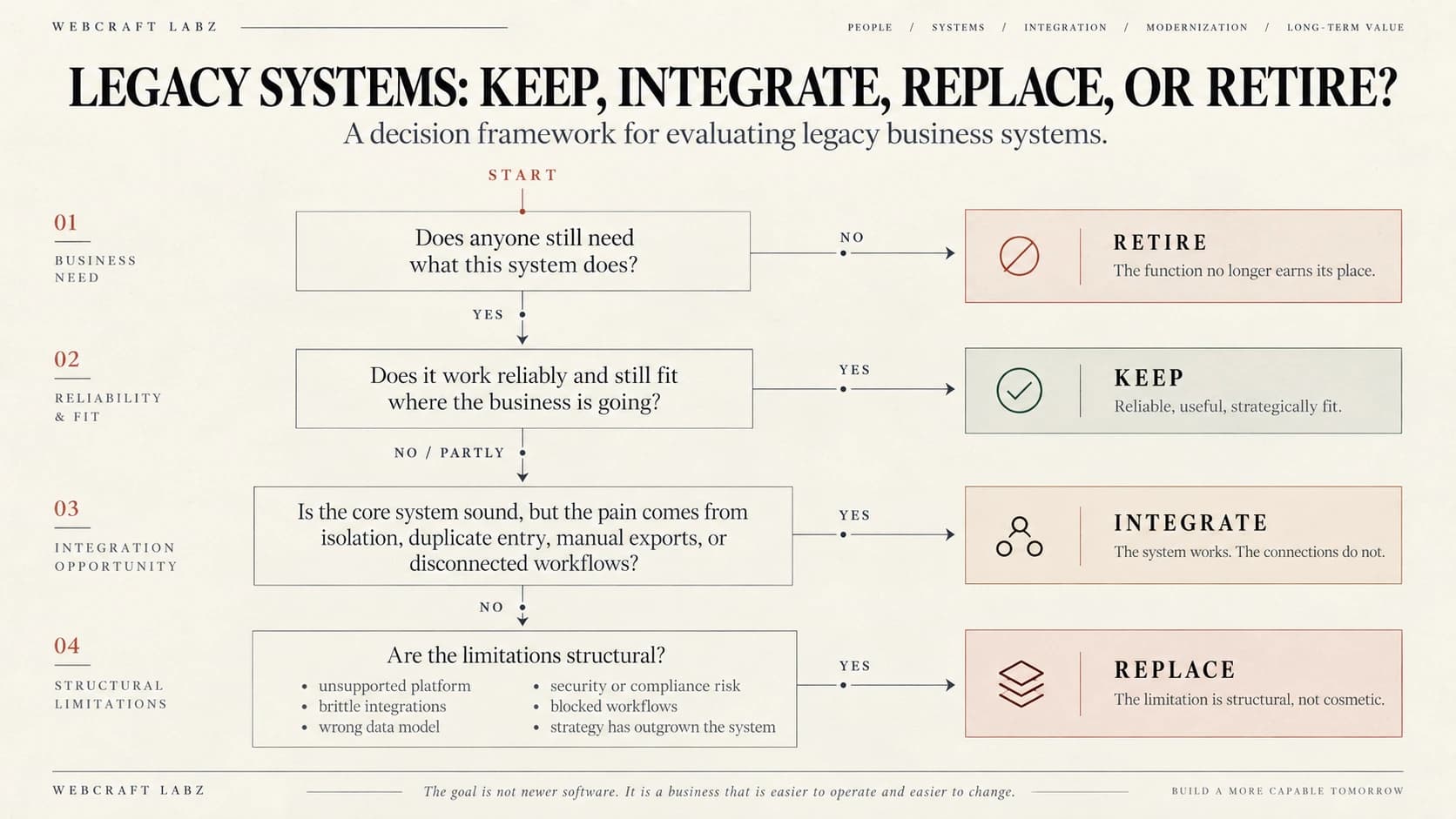
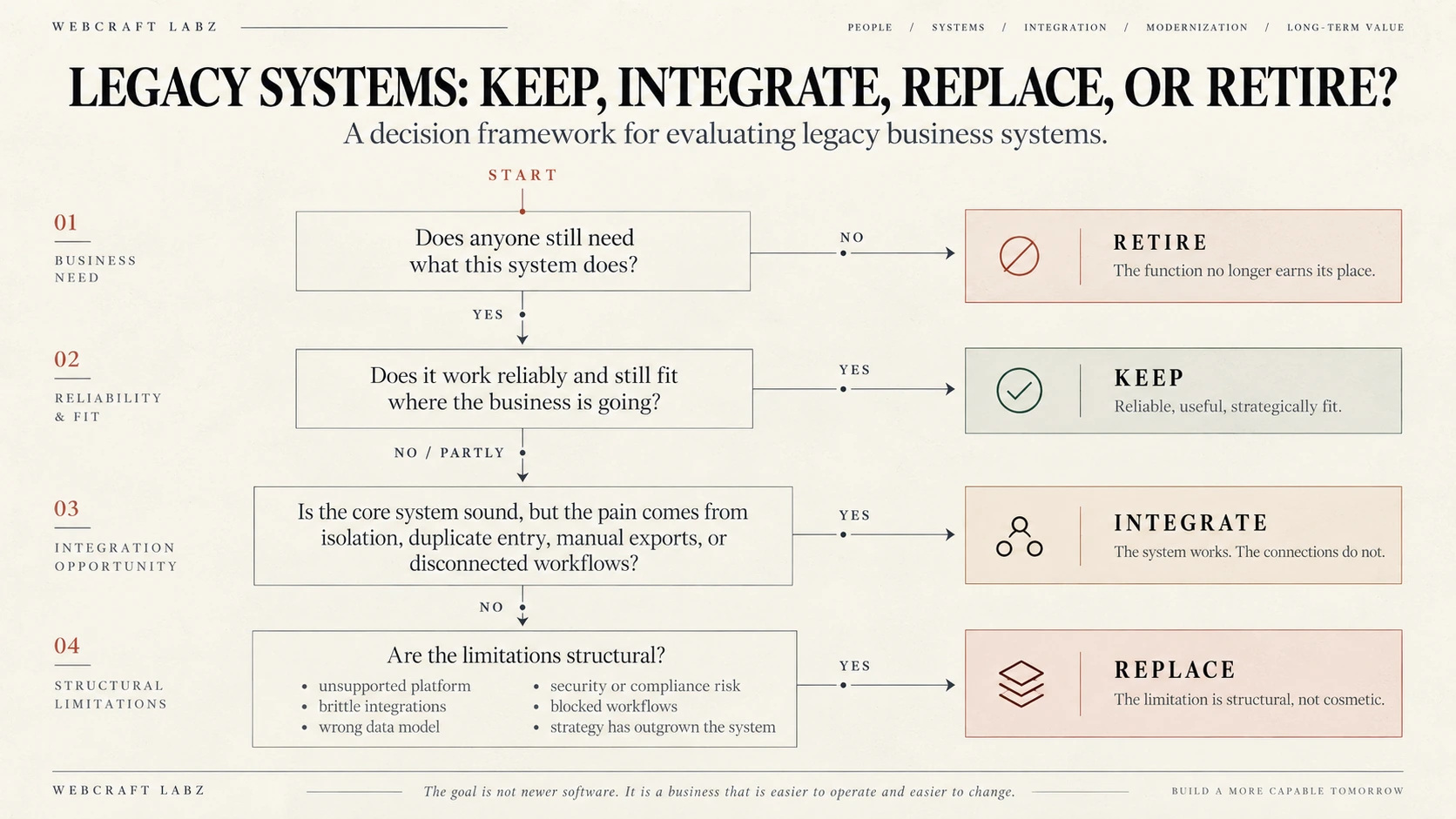
The tree is deliberately simple.
Does anyone still need what this system does? If no, Retire.
Does it work reliably and still fit where the business is going? If yes, Keep.
Does the core system work, but the pain comes from isolation, duplicate entry, manual exports, or disconnected workflows? If yes, Integrate.
Are the limitations structural? If yes, Replace.
Real systems do not always sort cleanly.
A platform might be a keeper for accounting and a problem for reporting. Another may deserve integration today and replacement two years from now.
The point of the tree is not to produce a mechanical answer.
It is to make the conversation begin with what is this system actually for? instead of what should we buy?
What Each Outcome Means
Keep
Keeping a system is not a failure to modernize.
It may not be fashionable. The interface may look dated. But if the system works, employees understand it, its data is trustworthy, and replacing it would create more risk than value, leaving it alone may be the mature decision.
Modernization is not measured by how many new tools appear in the company.
It is measured by whether the company becomes easier to operate and easier to change.
Integrate
Sometimes the system is not the problem.
Its isolation is.
A scheduling platform works well but forces staff to re-enter customer information from the CRM. An accounting system is reliable but disconnected from project management. A warehouse database contains exactly the right information but releases it only through manual exports.
Replacing those systems may be unnecessary.
APIs, middleware, synchronization services, event-driven workflows, or carefully designed scheduled imports can remove large amounts of manual work without forcing the organization through a full migration.
Integration makes the most sense when the underlying system is stable and the workflow around it is fragmented.
Replace
Some systems really are holding the organization back.
The signal is usually that the limitations are structural rather than cosmetic.
The vendor has stopped supporting the platform. Every integration depends on brittle workarounds. Reporting cannot be trusted. Data is trapped in formats that get harder to work with every year. Employees are building shadow systems around the official one because the official one cannot keep up.
At that point, the old platform may cost more than its replacement, even if the license looks cheap.
The real cost appears in lost time, duplicate work, bad data, delayed decisions, specialized maintenance, and opportunities the organization cannot pursue.
Once replacement is justified, the next question becomes a different one: what should replace it?
That is where the decision crosses into software strategy. Custom Software vs. Off-the-Shelf: A Build-vs-Buy Framework looks at the next choice in that chain.
Replacement is not the end of the decision process.
It is the beginning of the next one.
Retire
This is the outcome companies often avoid.
Some systems do not need replacements.
They need an ending.
A tool survives because a department used it years ago. A database duplicates information that now lives somewhere else. An old portal stays online even though nobody meaningfully uses it. A spreadsheet survives because one monthly report still pulls from it.
Organizations accumulate technology the way buildings accumulate old wiring, until there are circuits nobody can identify and everyone is afraid to disconnect.
When you trace an old electrical system, you do not start cutting wires because they look old.
You identify what the circuit feeds, what else shares it, and what will go dark when you open it.
Retiring a system works the same way.
Confirm who uses it. Confirm what depends on it. Confirm where its data needs to go. Confirm which records must be preserved.
Then disconnect it.
Every system you eliminate is one less thing to maintain, secure, document, integrate, back up, monitor, and explain to the next employee.
Change It Without Breaking the Business
Replacement Doesn't Have to Be a Switch Flip
Even when replacement is clearly the right decision, it does not have to mean a giant migration followed by a dramatic Monday-morning cutover.
Staged replacement is often safer.
Old and new systems can run side by side while individual functions move across. Data can migrate incrementally instead of through one high-stakes transfer. In some cases, the interface changes first while an older back end continues working until the organization is ready to replace that layer too.
A rollback path remains available.
The old system is decommissioned only after its dependencies have been proven to work without it.
The same principle applies when modernizing an aging website. In Beyond the Redesign: What Website Modernization Actually Requires, migration is treated as an engineering problem of its own rather than the final checkbox before launch.
The best modernization strategy is not necessarily the most technically ambitious one.
It is the one that reduces risk while creating room for future change.
Don't Replace a Monolith With Another Monolith
Replacing an old system without changing the architecture around it can recreate the same dependency problems almost immediately.
The new CRM becomes the place everything gets buried. The new SaaS platform gets customized until leaving becomes impossible. Business logic moves into a vendor-specific automation builder nobody else understands. Data gets trapped again, only this time behind a newer interface.
Modernization should reduce dependency, not transfer it.
That means deciding what each system should own and what should remain independent.
Customer data should not become inaccessible because the CRM changes. Core business rules should not live only inside one vendor's tooling. Important documents should not sit inside a platform that cannot export them cleanly.
What you want are clear boundaries.
Each system performs a defined job. Data has an owner. Integrations connect responsibilities without turning every application into a dependency of every other application.
When that is true, replacing one part of the stack does not require reconstructing everything around it.
The Goal Is Not a New Stack
A modern technology strategy is not measured by the number of systems replaced.
It is measured by how much easier the organization becomes to operate and to change.
Some legacy systems should survive. Some should be connected. Some should be replaced. Some should finally be shut down.
The difficult part is resisting the urge to decide before understanding the system.
Because modernization works best when replacement is the result of analysis, not the starting assumption.
The question is not whether your technology is old. The question is whether it still earns its place.
Build Something Better
Ideas deserve a better home than a generic blog.
WebCraft Labz builds fast, polished websites for businesses and creators who want their ideas to feel premium from the first scroll.
Start a ProjectContinue Reading